
17 KiB
pyecharts API
This document describes the public API for pyecharts library and it will be read by users and developers.
Total Proccess
A common proccess can be listed as the following table:
| Step | Code Demo | Remark |
|---|---|---|
| 1 Create chart instance | bar = Bar() |
|
| 2 Add data | bar.add(**kwargs) |
|
| 3 Add event handler | bar.on(event_name, handler) |
added in v0.5.0 |
| 4 Create config instance | config = PyEchartsConfig(**kwargs) |
|
| 5 Create template engine | engine = EchartsEnvironment(pyecharts_config=config) |
|
| 6 Get template file | tpl = engine.get_template('demo_tpl.html') |
|
| 7 Render | html = tpl.render(bar=bar) |
|
| 8 Write to target file | write_utf8_html_file('my_demo_chart.html', html) |
pyecharts Config Items
pyecharts follows the principle of "Config-Use" . The class pyecharts.conf.PyEChartsConfig contains all config items when using pyecharts library. If you use the chart.render() rendering method, you can modify the default configuration class in pyecharts via the module function configure.
import pyecharts
pyecharts.configure(
    jshost=None,
    echarts_template_dir=None,
    force_js_embed=None,
    output_image=None,
    global_theme=None
)
jshost
js file repository path. You can set a local or remote url. All remote url must start with http:// or https://. This option can also be set with the pyecharts.online() function.
For compatibility, jshost does not have to end with a separator such as '/'.
echarts_template_dir
The diretory of template files. Default value: '.'(current diretory). Used to customize the template file. The template_name parameter of render constitutes the entire path.
force_js_embed
Whether to force to insert javascript file with internal embed mode. This item will affect the function echarts_js_dependencies .
output_image
Specify the output image type with svg , jpeg , png options.
global_theme
Specify global themes, currently available as dark, vintage, macarons, infographic, shine and roma.
Charts Classes
Charts classes is the core component of this library.Each charts class represents the one kind of chart in ECharts .
The following table shows the inheritance of these charts.

Properties
This table list properties for these chart classes.
| Properites/Charts | Base | Chart/FOO_CHART | Grid | Overlap | Timeline | Page |
|---|---|---|---|---|---|---|
| chart_id | ✓ | ✓ | ✓ | ✓ | ✓ | |
| width | ✓ | ✓ | ✓ | ✓ | ✓ | |
| heigth | ✓ | ✓ | ✓ | ✓ | ✓ | |
| options | ✓ | ✓ | ✓ | ✓ | ✓ | |
| js_dependencies | ✓ | ✓ | ✓ | ✓ | ✓ | ✓ |
chart_id
Data type : str. The unique identifier string for a chart. Default value is uuid format string, e.g.'d2d9dcc4e28247518186c0882d356ba8' 。
width
Data type : number/str. A valid string for css length.The width(px) of div container for a chart.
height
Data type : number/str. A valid string for css length.The height(px) of div container for a chart.
chart_id, width, and height attributes all support writable.
options
Data type : dict. The config options for a chart. Each chart has its own format and value. Please see more detail at ECharts document。
js_dependencies
Data type : list. The js filename collections for a chart's dependencies. Every element do not contain the filename extension(.js), e.g. {'echarts.min', 'fujian'} .
Since v0.4, pyecharts rewrites the generation logic of
js_dependencies. Currently returns an ordered, unique element list object. You can also merge the js dependencies of several charts with thepyecharts.utils.merge_js_dependenciesfunction.
Methods
add()
Add options and data to a chart.See the source code for more detail.
| Chart Class | Function Sign |
|---|---|
| Base | add(**echarts_options) |
| Grid | add(grid_width=None, grid_height=None, grid_top=None, grid_bottom=None, grid_left=None, grid_right=None) |
| Overlap | add(chart, xaix_index=0, yaix_index=0, id_add_xaxis=False, is_add_yaxis=False) |
| Timeline | add(chart, time_point) |
| Page | add(achart_or_charts) |
on(event_name, handler)
- event_name:event name
- handler:callback function
Below is all supported events
# Mouse Events

MOUSE_CLICK = 'click'
MOUSE_DBCLICK = 'dbclick'
MOUSE_DOWN = 'mousedown'
MOUSE_OVER = 'mouseover'
MOUSE_GLOBALOUT = 'globalout'

# Other Events

LEGEND_SELECT_CHANGED = 'legendselectchanged'
LEGEND_SELECTED = 'legendselected'
LEGEND_UNSELECTAED = 'legendunselected'
LEGEND_SCROLL = 'legendscroll'
DATA_ZOOM = 'datazoom'
DATA_RANGE_SELECTED = 'datarangeselected'
TIMELINE_CHANGED = 'timelinechanged'
TIMELINE_PLAY_CHANGED = 'timelineplaychanged'
RESTORE = 'restore'
DATA_VIEW_CHANGED = 'dataviewchanged'
MAGIC_TYPE_CHANGED = 'magictypechanged'
GEO_SELECT_CHANGED = 'geoselectchanged'
GEO_SELECTED = 'geoselected'
GEO_UNSELECTED = 'geounselected'
PIE_SELECT_CHANGED = 'pieselectchanged'
PIE_SELECTED = 'pieselected'
PIE_UNSELECTED = 'pieunselected'
MAP_SELECT_CHANGED = 'mapselectchanged'
MAP_SELECTED = 'mapselected'
MAP_UNSELECTED = 'mapunselected'
AXIS_AREA_SELECTED = 'axisareaselected'
FOCUS_NODE_ADJACENCY = 'focusnodeadjacency'
UNFOCUS_NODE_ADJACENCY = 'unfocusnodeadjacency'
BRUSH = 'brush'
BRUSH_SELECTED = 'brushselected'
Prototype of event handler:
def handler(params):
    pass
Here, the structure of params is exactly the same as echarts:
{
    // type of the component to which the clicked glyph belongs
    // i.e., 'series', 'markLine', 'markPoint', 'timeLine'
    componentType: string,
    // series type (make sense when componentType is 'series')
    // i.e., 'line', 'bar', 'pie'
    seriesType: string,
    // series index in incoming option.series (make sense when componentType is 'series')
    seriesIndex: number,
    // series name (make sense when componentType is 'series')
    seriesName: string,
    // data name, category name
    name: string,
    // data index in incoming data array
    dataIndex: number,
    // incoming rwa data item
    data: Object,
    // Some series, such as sankey or graph, maintains more than
    // one types of data (nodeData and edgeData), which can be
    // distinguished from each other by dataType with its value
    // 'node' and 'edge'.
    // On the other hand, most series has only one type of data,
    // where dataType is not needed.
    dataType: string,
    // incoming data value
    value: number|Array
    // color of component (make sense when componentType is 'series')
    color: string
}
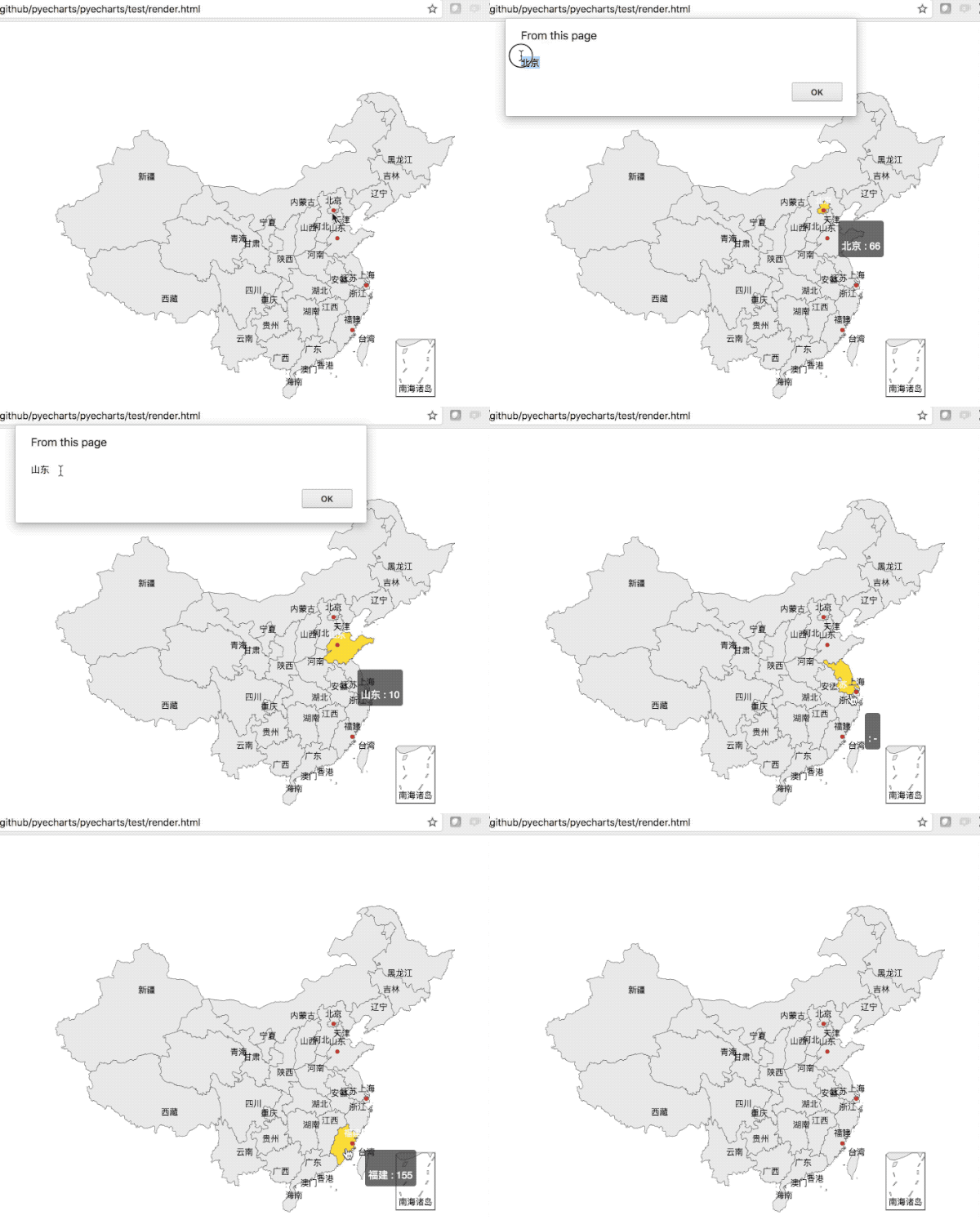
Example :
# coding=utf-8
from __future__ import unicode_literals

from pyecharts import Map
import pyecharts.events as events
from pyecharts_javascripthon.dom.functions import alert


def on_click(params):
    alert(params.name)

value = [155, 10, 66, 78]
attr = ["福建", "山东", "北京", "上海"]
map = Map("全国地图示例", width=1200, height=600)
map.add("", attr, value, maptype='china', is_label_show=True)
map.on(events.MOUSE_CLICK, on_click)
map.render()
get_js_dependencies()
Get the javascript dependencies of a chart. Unlike the attribute js_dependencies, the element here contains the full path to the file.
render(path='render.html', template_name='simple_chart.html', object_name='chart', extra_context=None)
Render to the specified HTML page, using the default template file for different chart types. The meaning of each parameter is as follows:
- path :final generated file name
- template_name : the name of the template file whose directory can be configured via the
pyecharts.configure()global function - object_name : The name of the variable used by the chart class in the template file
- extra_context : Extra data dictionary
render_embed()
Render javascript code fragment including options.
print_echarts_options()
Print all options of charts.
show_config()
Print all options of charts. From v0.3.3,this method has been deprecated and use print_echarts_options instead.
Multiple Chart Page
Changed in v0.5.4, override internal implementation, add chart name.
Basic usage
Since either the Jinja2 template or the Django template, it is not recommended to use the {{ charts.1 }} form to access an element in the list. So reconstruct the Page in v0.5.4 and add a chart named name.
After creating a Page instance page , add a chart object with add_chart and use name to give it a reference name.
from pyecharts import Page, Line, Bar

page = Page()
line = Line('Demo Line')
# ... Add data to line
page.add_chart(line, name='line')
bar = Bar('Demo kline')
# ... Add data to bar
page.add_chart(bar)
Chart access method
| Project | Python Code | Template Code |
|---|---|---|
| line instance | print(page['line']) |
{{ page.line }} |
| bar instance | print(page['c1']) |
{{ page.c1 }} |
Methods list
After you create a page instance, you can add an existing chart instance to the instance in a variety of ways.
Page no longer has all the features of list, so methods such as slice, append, and extend are no longer supported.
__init__(page_title, **name_chart_pair)
Constructor, create an instance using {<name>:<chart>}. According to [PEP 468] (https://www.python.org/dev/peps/pep-0468/), the order is guaranteed only in Python 3.6+.
add_chart(chart, name=None)
V0.5.4 added and support chaining. Add a chart object. If the name parameter is not specified, the default is to use a string like 'c0', 'c1'.
add(achart_or_charts)
Support chaining. Add one or more chart objects that use the default name.
cls.from_charts(*charts)
Create a Page instance from one or more chart instances.
Chart methods
To be precise, Page is not a chart type in ECharts, and the included charts are not required to be relevant. For convenience, Page also has associated property methods, including:
page_titlejs_dependenciesrender_embed()get_js_dependencies()_repr_html_()
These methods are used in the same way as the Base class.
Template Engine
Overview
pyecharts use Jinja2 as its template engine, with some ECharts chart related template functions.
Template function and template tag are the same feature in the area of template engine. In Django it is called template tag and it is called template function in jinja2. The grammatical forms of them are also different.
Engine Class
pyecharts.engine module defines some engine class, which inherit from jinja2.Environment. Each class has different use case.
BaseEnvironment
pyecharts.engine.BaseEnvironment
This class is the basic engine in pyecharts, and it inherits from jinja2.Environment . It has the following extra features:
- Add pyecharts_config attribute, it is a
PyEchartsConfigobject. - Add
echarts_*template functions
This class can be used for integration with web framework.
EChartsEnvironment
pyecharts.engine.EChartsEnvironment
EChartsEnvironment class inherits from BaseEnvironment. And on this basis, the behavior of the template file loader (loader) is rewritten. And it use pyecharts_config.echarts_template_dir as the default value of template folder.
This class should not be used in web integration because of overwriting the default behavior of template file loader.
ECHAERTS_TEMPLATE_FUNCTIONS
pyecharts.engine.ECHAERTS_TEMPLATE_FUNCTIONS
The dictionary containing template functions. It can be used in web integration.
Engine method
create_default_environment(filet_ype)
- file_type : output file type, 'html', 'svg', 'png', 'jpeg', 'gif', 'pdf' options
Create a default configuration environment for rendering
Template functions
pyecharts contains some template functions, which receives one or more Chart / Page objects as its parameter. See the following table.
| Function Name/Function Sign | F(chart) | F(page) | F(chart1,chart2,...)/F(*page) |
|---|---|---|---|
| echarts_js_dependencies | ✓ | ✓ | ✓ |
| echarts_js_dependencies_embed | ✓ | ✓ | ✓ |
| echarts_container | ✓ | ||
| echarts_js_content | ✓ | ✓ | ✓ |
| echarts_js_content_wrap | ✓ | ✓ | ✓ |
echarts_js_dependencies
pyecharts.template.echarts_js_dependencies(*args)
Render script html nodes with internal embed mode or external link. The mode will follow this table.
Internal Embed(IE)
<script type="text/javascript">
    var a = 1;
    console.log(a):
</script>
Enternal Link(EL)
<script type="text/javascript" src="/static/js/echarts.min.js"></script>
Which mode is used is determined by the PyEchartsConfig.jshost and PyEchartsConfig.force_js_embed. See the following table :
| Value | local/remote | script mode | Use Case | Remark |
|---|---|---|---|---|
/template/js/echarts |
local | IE | Generate one file locally | Default value |
'https://pyecharts.github.io/jupyter-echarts/echarts' |
remote | IE | Generate on file | switch using online |
Other Local Host (E.g. /static/js) |
local | EL, Can be changed to inline by force_embed | Integrate with Web | |
Other Remote Host(E.g. https://cdn.bootcss.com/echarts/3.7.2) |
remote | EL | Use remote JS |
Example
# Jinja2 Context function
{{ echarts_js_dependencies('echarts') }}
# Html Output
<script type="text/javascript" src="js/echarts.js"></script>

# Python
bar = Bar('Demo Bar')
# Jinja2 Context function
{{ echarts_js_dependencies(bar) }}
# Html Output
<script type="text/javascript" src="js/echarts.js"></script>
echarts_js_dependencies_embed
pyecharts.template.echarts.js_dependencies_embed(*args)
Render script nodes in internal embed mode. Only support local jshost.
echarts_container
pyecharts.template.echarts_container(chart)
Render the html node of container, output <div></div> element.
Example
# Python Code
bar = Bar('Demo Bar')
# Jinjia2 Context Function
{{ echarts_container(bar) }}
# Html Output
<div id="d09aa82b55384f84a33055f9878c3679" style="width:800px;height:400px;"></div>
echarts_js_content
pyecharts.template.echarts_container(*chart)
Render the js initial code fragment without the <script></script> .
echarts_js_content_wrap
pyecharts.template.echarts_js_content_wrap(*args)
Render the js initial code fragment with the <script></script> .
Example
This is a full example.
The pythonfile:demo.py
from __future__ import unicode_literals

from pyecharts import Bar
from pyecharts.conf import PyEchartsConfig
from pyecharts.engine import EchartsEnvironment
from pyecharts.utils import write_utf8_html_file

attr = ["衬衫", "羊毛衫", "雪纺衫", "裤子", "高跟鞋", "袜子"]
v1 = [5, 20, 36, 10, 75, 90]
v2 = [10, 25, 8, 60, 20, 80]
bar = Bar("柱状图数据堆叠示例")
bar.add("商家A", attr, v1, is_stack=True)
bar.add("商家B", attr, v2, is_stack=True)
config = PyEchartsConfig(echarts_template_dir='my_tpl',
                         jshost=options)
env = EchartsEnvironment(pyecharts_config=config)
tpl = env.get_template('tpl_demo.html')
html = tpl.render(bar=bar)
write_utf8_html_file('my_tpl_demo2.html', html)
The template file:demo.html
<!DOCTYPE html>
<html lang="zh-CN">
<head>
    <meta charset="UTF-8">
    <title>自定义模板</title>
    {{ echarts_js_dependencies(bar) }}
</head>
<body>
{{ echarts_container(bar) }}
{{ echarts_js_content(bar) }}
</body>
</html>