mirror of
https://github.com/w3reality/three-geo.git
synced 2026-01-25 14:57:51 +00:00

190 lines
9.0 KiB
Markdown
190 lines
9.0 KiB
Markdown
# three-geo
|
|
|
|
[![NPM][npm-badge]][npm-url]
|
|
[![MIT licensed][mit-badge]][mit-url]
|
|
[![CI][actions-badge]][actions-url]
|
|
|
|
[npm-badge]: https://img.shields.io/npm/v/three-geo.svg
|
|
[npm-url]: https://www.npmjs.com/package/three-geo
|
|
[mit-badge]: https://img.shields.io/badge/license-MIT-blue.svg
|
|
[mit-url]: https://github.com/w3reality/three-geo/blob/master/LICENSE
|
|
[actions-badge]: https://github.com/w3reality/three-geo/workflows/CI/badge.svg
|
|
[actions-url]: https://github.com/w3reality/three-geo/actions
|
|
|
|
**three-geo** is a [three.js](https://github.com/mrdoob/three.js) based geographic visualization library. Using three-geo, we can easily build satellite-textured 3D terrain models in near real-time by simply specifying GPS coordinates anywhere on the globe. The geometry of the terrain is based on the RGB-encoded DEM (Digital Elevation Model) provided by the Mapbox Maps API.
|
|
|
|
The terrain is represented by standard [THREE.Mesh](https://threejs.org/docs/#api/en/objects/Mesh) objects. This makes it easy for us to access underlying geometry/texture array and perform original GIS (Geographic Information System) experiments in JavaScript. (See Usage for how to programatically obtain those mesh objects).
|
|
|
|
Credits: this library has been made possible thanks to
|
|
|
|
- geo-related libraries ([mapbox](https://github.com/mapbox), [Turfjs](https://github.com/Turfjs/turf)) and [the Mapbox Maps API](https://www.mapbox.com/api-documentation/#maps).
|
|
- [peterqliu](https://github.com/peterqliu) for informative 3D terrain-related articles and implementation.
|
|
|
|
## Demo
|
|
|
|
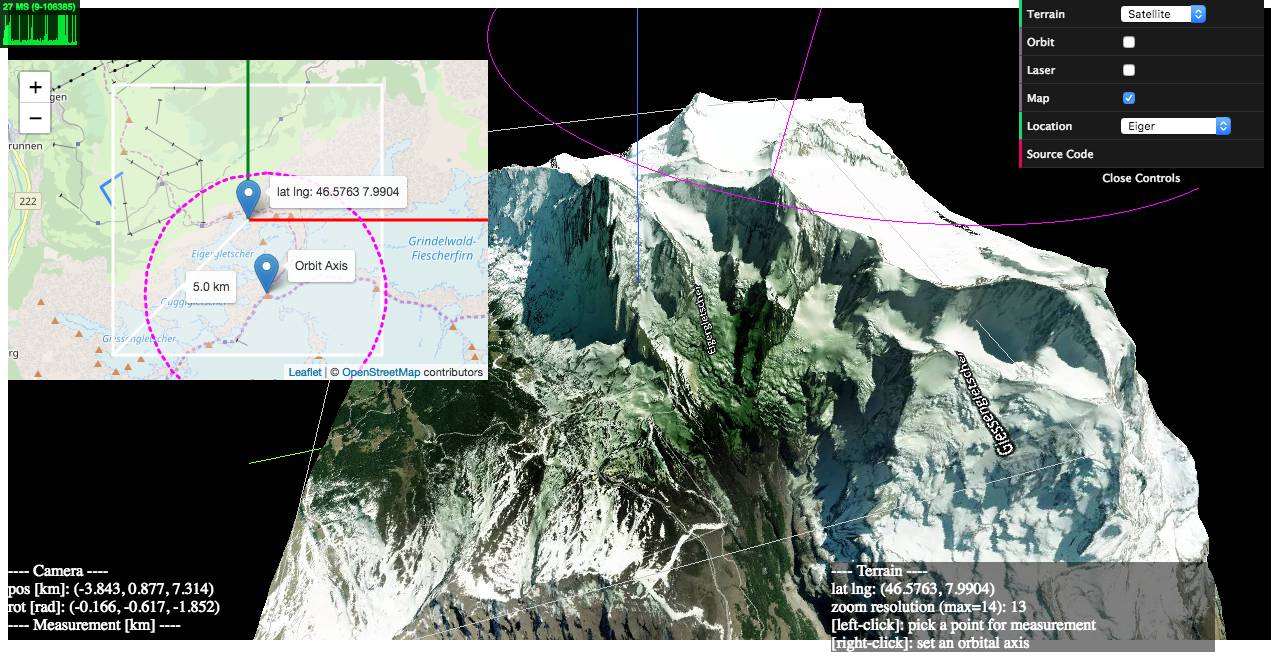
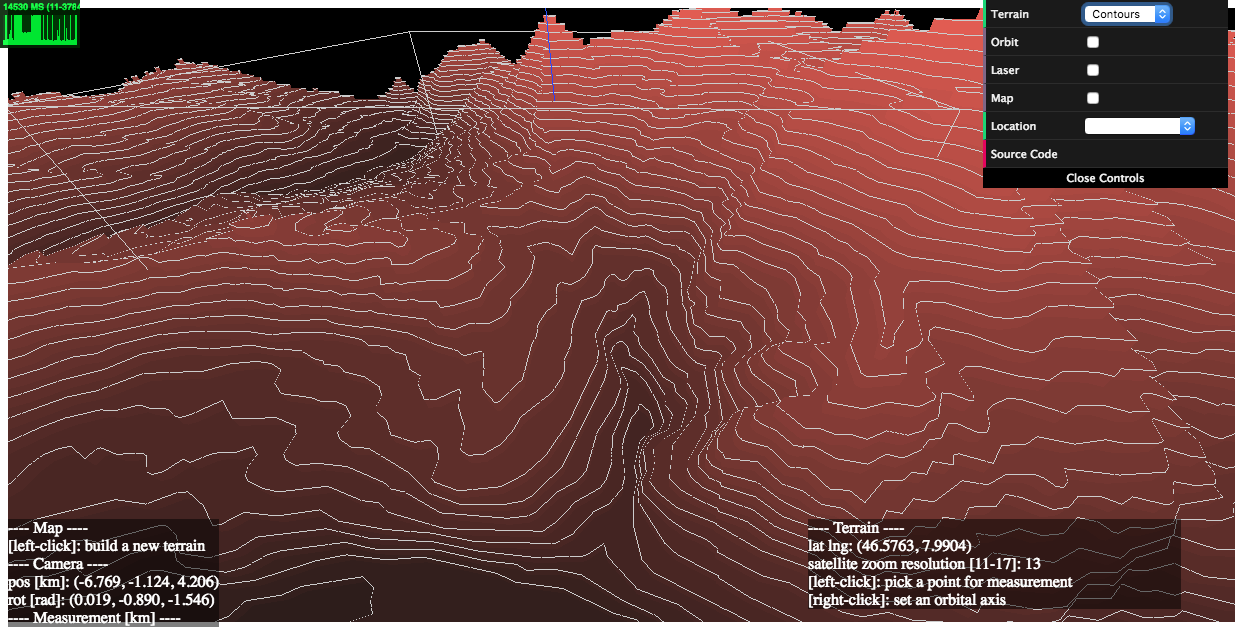
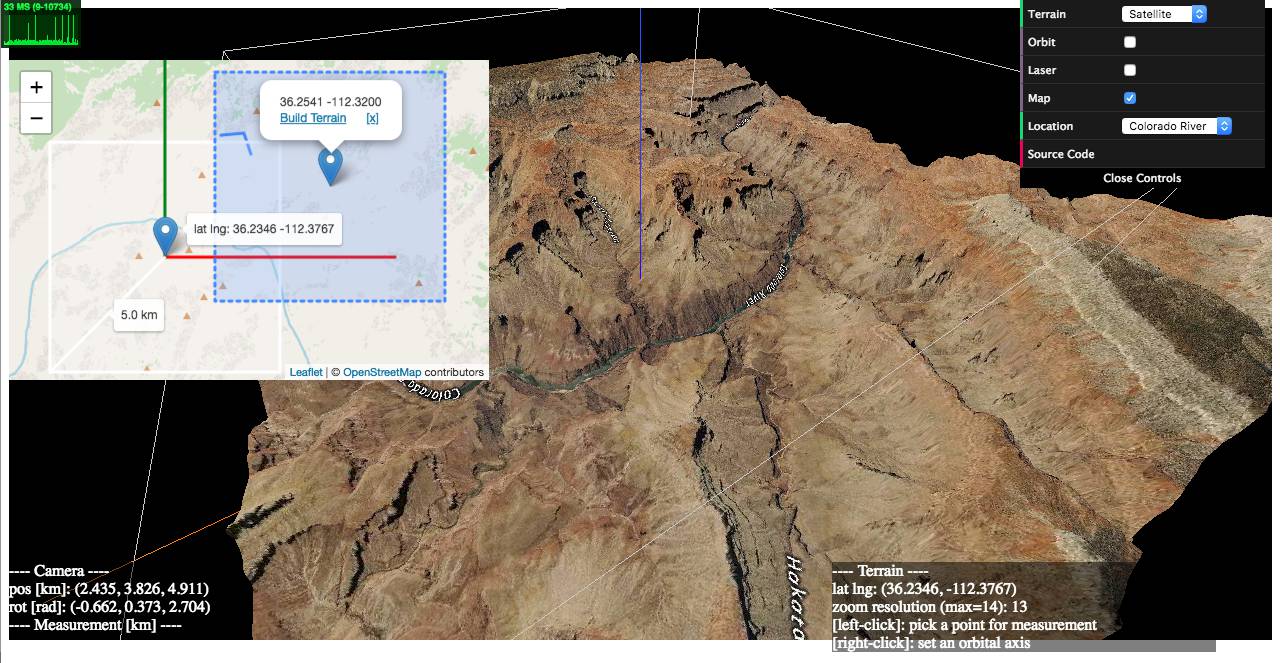
### 1) examples/geo-viewer ([live](https://w3reality.github.io/three-geo/examples/geo-viewer/io/index.html) | [source code](https://github.com/w3reality/three-geo/tree/master/examples/geo-viewer))
|
|
|
|
This demo app includes features such as
|
|
|
|
- on-demand 3D terrain building (by a mouse click on the Leaflet map),
|
|
- real-time camera projection onto Leaflet (with oritentaion and HFoV indication),
|
|
- terrain interaction with a VR-like laser beam,
|
|
- measuring Euclidean distances between terrain points,
|
|
- auto camera orbiting around the custom z-axis.
|
|
|
|
Live:
|
|
|
|
- <https://w3reality.github.io/three-geo/examples/geo-viewer/io/index.html?lat=46.5763&lng=7.9904>
|
|
|
|
[](https://w3reality.github.io/three-geo/examples/geo-viewer/io/index.html?lat=46.5763&lng=7.9904&title=Eiger)
|
|
|
|
- <https://w3reality.github.io/three-geo/examples/geo-viewer/io/index.html?lat=46.5763&lng=7.9904&mode=contours>
|
|
|
|
[](https://w3reality.github.io/three-geo/examples/geo-viewer/io/index.html?lat=46.5763&lng=7.9904&mode=contours&title=Eiger)
|
|
|
|
- <https://w3reality.github.io/three-geo/examples/geo-viewer/io/index.html?lat=36.2058&lng=-112.4413>
|
|
|
|
[](https://w3reality.github.io/three-geo/examples/geo-viewer/io/index.html?lat=36.2058&lng=-112.4413&title=Colorado_River)
|
|
|
|
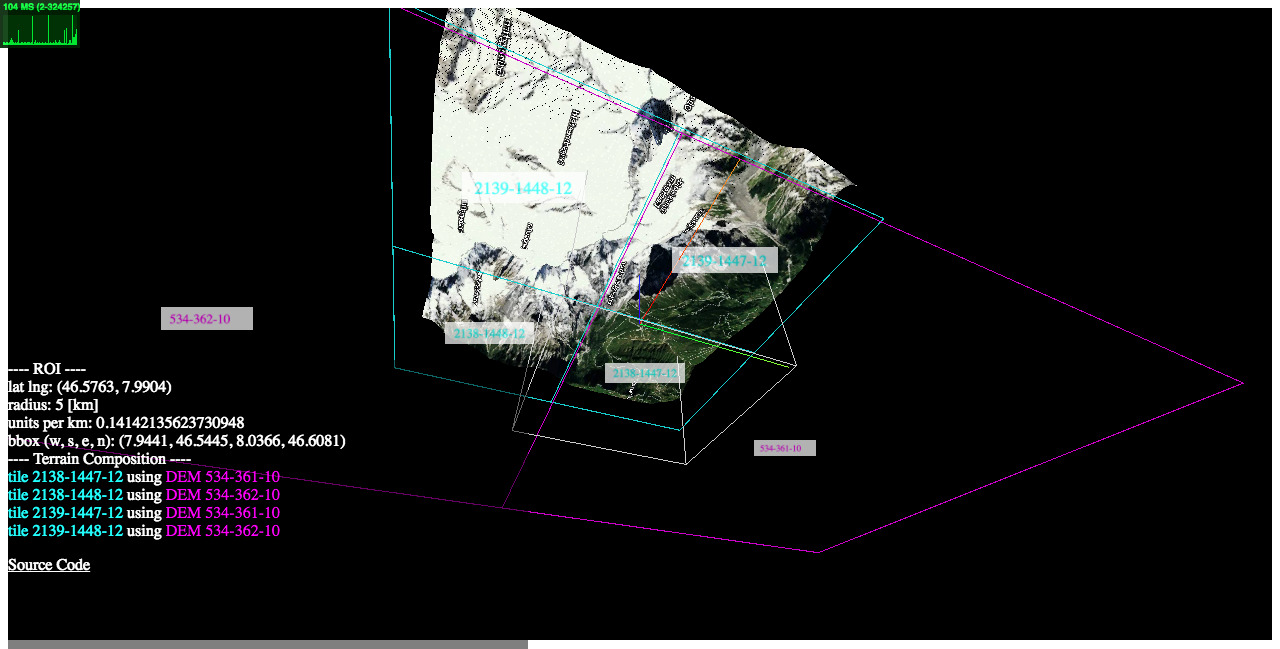
### 2) examples/heightmaps ([live](https://w3reality.github.io/three-geo/examples/heightmaps/index.html) | [source code](https://github.com/w3reality/three-geo/tree/master/examples/heightmaps))
|
|
|
|
This demo illustrates the relationship between a reconstructed 3D terrain and its underlying satellite/DEM tiles.
|
|
|
|
[](https://w3reality.github.io/three-geo/examples/heightmaps/index.html)
|
|
|
|
### 3) examples/flat ([live](https://w3reality.github.io/three-geo/examples/flat/index.html) | [source code](https://github.com/w3reality/three-geo/tree/master/examples/flat/index.html))
|
|
|
|
How to get a flattened view of the terrain by post-editing the underlying geometry.
|
|
|
|
### <a name="ex-proj"></a>4) examples/projection ([live](https://w3reality.github.io/three-geo/examples/projection/index.html) | [source code](https://github.com/w3reality/three-geo/tree/master/examples/projection/index.html))
|
|
|
|
How to register a new 3D object on top of the terrain based on its geographic location `[latitude, longitude, elevation]`.
|
|
|
|
## Setup
|
|
|
|
**Installation**
|
|
|
|
```
|
|
$ npm i three-geo
|
|
```
|
|
|
|
**Loading**
|
|
|
|
Script tag: use `ThreeGeo` after
|
|
|
|
```
|
|
<script src="dist/three-geo.min.js"></script>
|
|
```
|
|
|
|
ES6:
|
|
|
|
```
|
|
import ThreeGeo from 'dist/three-geo.esm.js';
|
|
```
|
|
|
|
## Usage
|
|
|
|
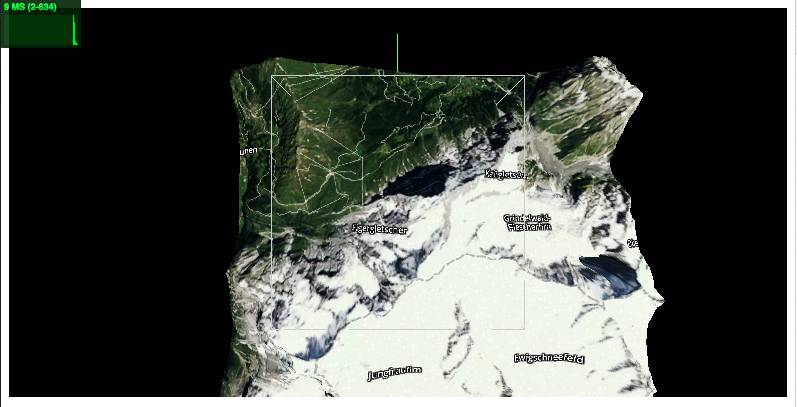
Here is an example of how to build a geographic terrain located at GPS coordinates (46.5763, 7.9904) in a 5 km radius circle. The terrain's satellite zoom resolution is set to 12. (The highest zoom value supported is 17.)
|
|
|
|
For standalone tests, use **examples/simple-viewer** ([source code](https://github.com/w3reality/three-geo/tree/master/examples/simple-viewer)).
|
|
|
|
For use with NodeJS, do enable [this `isNode` option](#note-nodejs) as well.
|
|
|
|
```js
|
|
const tgeo = new ThreeGeo({
|
|
tokenMapbox: '********', // <---- set your Mapbox API token here
|
|
});
|
|
|
|
const terrain = await tgeo.getTerrainRgb(
|
|
[46.5763, 7.9904], // [lat, lng]
|
|
5.0, // radius of bounding circle (km)
|
|
12); // zoom resolution
|
|
|
|
const scene = new THREE.Scene();
|
|
scene.add(terrain);
|
|
|
|
const renderer = new THREE.WebGLRenderer({ canvas });
|
|
renderer.render(scene, camera);
|
|
```
|
|
|
|
|
|
|
|
## Who is using `three-geo`?
|
|
|
|
- [jet-wasp](https://jet-wasp.glitch.me/) - Three-geo as A-Frame component ([source code](https://glitch.com/edit/#!/jet-wasp))
|
|
- [locus-pocus](https://locus-pocus.io/) - A webapp to visualise your area using three-geo
|
|
- *Your App* - *PR us!*
|
|
|
|
## API
|
|
|
|
In this section, we list `three-geo`'s public API methods, where `origin`, `radius`, and `zoom` are parameters common to them:
|
|
|
|
- `origin` **Array\<number\>** Center of the terrain represented as GPS coordinates `[latitude, longitude]`.
|
|
|
|
- `radius` **number** Radius of the circle that fits the terrain.
|
|
|
|
- `zoom` **number (integer)** Satellite zoom resolution of the tiles in the terrain. Select from {11, 12, 13, 14, 15, 16, 17}, where 17 is the highest value supported. For a fixed radius, higher zoom resolution results in more tileset API calls.
|
|
|
|
|
|
`ThreeGeo`
|
|
|
|
- `constructor(opts={})`
|
|
|
|
Create a ThreeGeo instance with parameters.
|
|
|
|
- `opts.tokenMapbox`=\"\" **string** Mapbox API token. This must be provided.
|
|
|
|
- `opts.unitsSide`=1.0 **number** The side length of the square that fits the terrain in WebGL space.
|
|
|
|
- `opts.isNode`=false **boolean** <a name="note-nodejs"></a>To use three-geo with NodeJS, you must explicitly set this option to `true`. [ Added in v1.4.5 ]
|
|
|
|
- `async getTerrainRgb(origin, radius, zoom)` [ Added in v1.4 ]
|
|
|
|
Return a **THREE.Group** object that represents a 3D surface of the terrain.
|
|
|
|
The group object contains an **Array\<THREE.Mesh\>** as `.children`. Each mesh corresponds to a partial geometry of the terrain textured with satellite images.
|
|
|
|
- `async getTerrainVector(origin, radius, zoom)` [ Added in v1.4 ]
|
|
|
|
Return a **THREE.Group** object that represents a 3D contour map of the terrain.
|
|
|
|
The group object contains an **Array\<THREE.Object3D\>** as `.children`. Each child object is either an extruded **THREE.Mesh** with `.name` attribute prefixed by `dem-vec-shade-<ele>-`, or a **THREE.Line** with `.name` prefixed by `dem-vec-line-<ele>-` (`<ele>` is the height of each contour in meters).
|
|
|
|
- `getProjection(origin, radius, unitsSide=1.0)` [ [Example](#ex-proj) ]
|
|
|
|
Return an object `{ proj, projInv, bbox, unitsPerMeter }` that includes transformation-related functions and parameters, where
|
|
|
|
- `proj(latlng)` is a function that maps geo coordinates `latlng` (an array `[lat, lng]`) to WebGL coordinates `[x, y]`.
|
|
|
|
- `projInv(x, y)` is a function that maps WebGL coordinates `[x, y]` to geo coordinates `[lat, lng]`.
|
|
|
|
- `bbox` is an array `[w, s, e, n]` that represents the computed bounding box of the terrain, where `w` (West) and `e` (East) are longitudinal limits; and `s` (South) and `n` (North) are latitudinal limits.
|
|
|
|
- `unitsPerMeter` is the length in WebGL-space per meter.
|
|
|
|
<p><details>
|
|
<summary>Legacy callback based API</summary>
|
|
|
|
- `getTerrain(origin, radius, zoom, callbacks={})`
|
|
|
|
- `callbacks.onRgbDem` **function (meshes) {}** Implement this to request the geometry of the terrain. Called when the entire terrain\'s geometry is obtained.
|
|
|
|
- `meshes` **Array\<THREE.Mesh\>** All the meshes belonging to the terrain.
|
|
|
|
- `callbacks.onSatelliteMat` **function (mesh) {}** Implement this to request the satellite textures of the terrain. Called when the satellite texture of each mesh belonging to the terrain is obtained.
|
|
|
|
- `mesh` **THREE.Mesh** One of the meshes that's part of the terrain.
|
|
|
|
- `callbacks.onVectorDem` **function (objs) {}** Implement this to request the contour map of the terrain. Called when the contour map of the terrain is obtained.
|
|
|
|
- `objs` **Array\<THREE.Object3D\>** Extruded meshes (**THREE.Mesh** objects with `.name` attribute prefixed by `dem-vec-shade-<ele>-`) and lines (**THREE.Line** objects with `.name` attribute prefixed by `dem-vec-line-<ele>-`), where `<ele>` is the height of each contour in meters.
|
|
|
|
</details></p>
|
|
|
|
## Build
|
|
|
|
```
|
|
$ npm i
|
|
$ npm run build
|
|
```
|