While testing the codemods on some projects, I noticed some issues with
the migration to the new `in-*` variant.

One such example is that we checked for `&` at the end, instead of ` &`
(the whitespace is significant).

This meant that `[figure>&]:my-0` was converted to `in-[figure>]:my-0`
which is wrong. In this case, we want to keep it as `[figure>&]:my-0`.

Additionally this PR brings back the migration from `group-[]:flex` to
`in-[.group]:flex`. If you are using a prefix, then `group-[]:tw-flex`
is migrated to `tw:in-[.tw\:group]:flex`.

Last but not least, this does some internal refactors to group
migrations logically together.
This PR fixes an issue where the Tailwind root file detection was wrong.

Whenever a CSS file contains any of the `@tailwind` directives or an
`@import` to any of the Tailwind files, the file is considered a
Tailwind root file.

If multiple CSS files are part of the same tree, then we make the
nearest common parent the root file.

This root file will be the file where we add `@config` and/or inject
other changes during the migration process.

However, if your folder structure looked like this:

```css
/* index.css */
@import "./base.css";
@import "./typography.css";
@import "tailwindcss/components"; /* This makes index.css a root file */
@import "./utilities.css";

/* base.css */
@tailwind base; /* This makes base.css a root file */

/* utilities.css */
@tailwind utilities; /* This makes utilities.css a root file */
```

Then we computed that `index.css` nad `base.css` were considered root
files even though they belong to the same tree (because `base.css` is
imported by `index.css`).

This PR fixes that behaviour by essentially being less smart, and just
checking again if any sheets are part of the same tree.

# Test plan:

Added an integration test that covers this scenario and fails before the
fix.

Also ran it on our tailwindcss.com codebase.

| Before | After |
| --- | --- |
| <img width="1072" alt="image"
src="https://github.com/user-attachments/assets/8ee99a59-335e-4221-b368-a8cd81e85191">
| <img width="1072" alt="image"
src="https://github.com/user-attachments/assets/fe5acae4-d3fc-43a4-bd31-eee768a3a6a5">
|

(Yes, I know the migration still fails, but that's a different issue.)
If you have a PostCSS config file, that is not simple (has functions,
requires, ...). In that case we don't migrate the PostCSS file. Because
we don't migrate, the `didMigrate` is still false and we continue with
the next migration.

The issue here is that there are 2 states encoded in the same variable
and they should be two separate variables because there is a difference
between:

1. Not finding a file at all
2. Finding a file, but not migrating it

Before this change, the output looks like this if you have a complex
PostCSS file:
```
│ Migrating PostCSS configuration…

│ The PostCSS config contains dynamic JavaScript and can not be automatically migrated.

│ No PostCSS config found, skipping migration.
```

After this change, the output looks like this:
```
│ Migrating PostCSS configuration…

│ ↳ The PostCSS config contains dynamic JavaScript and can not be automatically migrated.
```

Also updated the output to include `↳ ` to be consistent with the other
logs.
This fixes the negative versions of rotate:
`-rotate-y-*`, `-rotate-x-*`, and `-rotate-z-*`

They were producing CSS like `--tw-rotate-x: calc(rotateX(Xdeg) * -1)`
instead of `--tw-rotate-x: rotateX(calc(Xdeg * -1))`. This fixes all of
those. The skew utilities have a similar structure but were already
handled correctly.
This PR updates the `jiti` dependency we use for plugin loading to the
latest stable release.

## Test Plan

This was relying on integration tests which contains example of
TypeScript configs. It's also rebased to include the new examples from
https://github.com/tailwindlabs/tailwindcss/pull/15041.
This PR uses the `enhanced-resolve` instead of
`createRequire(…).resolve` which improves the usability when running the
upgrade tool locally using Bun.

While testing, we also noticed that it is not possible to use a
`cjs`-only plugin inside of an `esm` project. It was also not possible
to use an `esm`-only plugin inside of a `cjs` project.

# Test plan

We added integration tests in both the CLI (the CLI is an mjs project)
and in the PostCSS (where we can configure a `cjs` and `esm` PostCSS
config) integration tests where we created an `esm` and `cjs` based
project with 4 plugins (`cjs`-only, `esm`-only, and TypeScript based
plugins: `cts`-only and `mts`-only).
Closes#15012
We do not have replacements for these plugins _just yet_. In order to
increase compatibility with setups that rely on some of these legacy
plugins, this PR bundles `@tailwindcss/forms`,
`@tailwindcss/typography`, and `@tailwindcss/aspect-ratio` (after
https://github.com/tailwindlabs/tailwindcss/pull/15029) with the
standalone build now.
In comparison to v3, this omits the `@tailwindcss/container-queries`
plugin since is not a first-party feature of Tailwind CSS v4.
## Test Plan
Added an integration test. I also tested this by running the standalone
binary in a temporary folder with as simple input css:
```css
@import "tailwindcss";
@plugin "@tailwindcss/typography";
```
This implements backwards compatibility for colors that use the old
`<alpha-value>` feature from v3. We can do this by replacing
`<alpha-value>` with `1` because we use `color-mix` to actually apply
opacity modifiers in v4.
In some local testing we ran the `@tailwindcss/upgrade` command twice in
a row. It would be great to get some feedback that this is not working,
so this PR now checks if it can resolve the installed version of
`tailwindcss` and if it can, it requires it to be < 4 (you can bypass
this check with `--force`).

---------

Co-authored-by: Robin Malfait <malfait.robin@gmail.com>
This PR adds support for complex `addUtilities()` configuration objects
that use child combinators and other features.

For example, in v3 it was possible to add a utility that changes the
behavior of all children of the utility class node by doing something
like this:

```ts
addUtilities({
  '.red-children > *': {
    color: 'red',
  },
});
```

This is a pattern that was used by first-party plugins like
`@tailwindcss/aspect-ratio` but that we never made working in v4, since
it requires parsing the selector and properly extracting all utility
candidates.

While working on the codemod that can transform `@layer utilities`
scoped declarations like the above, we found out a pretty neat
heuristics on how to migrate these cases. We're basically finding all
class selectors and replace them with `&`. Then we create a nested CSS
structure like this:

```css
.red-children {
  & > * {
    color: red;
  }
}
```

Due to first party support for nesting, this works as expected in v4.

## Test Plan

We added unit tests to ensure the rewriting works in some edge cases.
Furthermore we added an integration test running the
`@tailwindcss/aspect-ratio` plugin. We've also installed the tarballs in
the Remix example from the
[playgrounds](https://github.com/philipp-spiess/tailwindcss-playgrounds)
and ensure we can use the `@tailwindcss/aspect-ratio` plugin just like
we could in v3:

<img width="2560" alt="Screenshot 2024-11-18 at 13 44 52"
src="https://github.com/user-attachments/assets/31889131-fad0-4c37-b574-cfac2b99f786">

---------

Co-authored-by: Robin Malfait <malfait.robin@gmail.com>
Co-authored-by: Jordan Pittman <jordan@cryptica.me>
This PR improves the discoverability of Tailwind config files when we
are trying to link them to your CSS files.

When you have multiple "root" CSS files in your project, and if they
don't include an `@config` directive, then we tried to find the Tailwind
config file in your current working directory.

This means that if you run the upgrade command from the root of your
project, and you have a nested folder with a separate Tailwind setup,
then the nested CSS file would link to the root Tailwind config file.

Visually, you can think of it like this:

```
.
├── admin
│   ├── src
│   │   └── styles
│   │       └── index.css       <-- This will be linked to (1)
│   └── tailwind.config.js      (2)
├── src
│   └── styles
│       └── index.css           <-- This will be linked to (1)
└── tailwind.config.js          (1)
```

If you run the upgrade command from the root of your project, then the
`/src/styles/index.css` will be linked to `/tailwind.config.js` which is
what we expect.

But `/admin/src/styles/index.css` will _also_ be linked to
`/tailwind.config.js`

With this PR we improve this behavior by looking at the CSS file, and
crawling up the parent tree. This mens that the new behavior looks like
this:

```
.
├── admin
│   ├── src
│   │   └── styles
│   │       └── index.css       <-- This will be linked to (2)
│   └── tailwind.config.js      (2)
├── src
│   └── styles
│       └── index.css           <-- This will be linked to (1)
└── tailwind.config.js          (1)
```

Now `/src/styles/index.css` will be linked to `/tailwind.config.js`, and
`/admin/src/styles/index.css` will be linked to
`/admin/tailwind.config.js`.

When we discover the Tailwind config file, we will also print a message
to the user to let them know which CSS file is linked to which Tailwind
config file.

This should be a safe improvement because if your Tailwind config file
had a different name, or if it lived in a sibling folder then Tailwind
wouldn't find it either and you already required a `@config "…";`
directive in your CSS file to point to the correct file.

In the unlikely event that it turns out that 2 (or more) CSS files
resolve to the same to the same Tailwind config file, then an upgrade
might not be safe and some manual intervention might be needed. In this
case, we will show a warning about this.

<img width="1552" alt="image"
src="https://github.com/user-attachments/assets/7a1ad11d-18c5-4b7d-9a02-14f0116ae955">


Test plan:
---

- Added an integration test that properly links the nearest Tailwind
config file by looking up the tree
- Added an integration test that resolves 2 or more CSS files to the
same config file, resulting in an error where manual intervention is
needed
- Ran it on the Tailwind UI codebase

Running this on Tailwind UI's codebase it looks like this:

<img width="1552" alt="image"
src="https://github.com/user-attachments/assets/21785428-5e0d-47f7-80ec-dab497f58784">

---------

Co-authored-by: Jordan Pittman <jordan@cryptica.me>
This PR adds a new `in-*` variant that allows you to apply utilities
when you are in a certain selector.

While doing research for codemods, we notice that some people use
`group-[]:flex` (yep, the arbitrary value is empty…). The idea behind is
that people want to know if you are in a `.group` or not.

Similarly, some people use `group-[]/name:flex` to know when you are in
a `.group/name` class or not.

This new `in-*` variant allows you to do that without any hacks.

If you want to check whether you are inside of a `p` tag, then you can
write `in-[p]:flex`. If you want to check that you are inside of a
`.group`, you can write `in-[.group]`.

This variant is also a compound variant, which means that you can write
`in-data-visible:flex` which generates the following CSS:
```css
:where([data-visible]) .in-data-visible\:flex {
  display: flex;
}
```

This variant also compounds with `not-*`, for example:
`not-in-[.group]:flex`.

Additionally, this PR also includes a codemod to convert `group-[]:flex`
to `in-[.group]:flex`.

---

This was proposed before for v3 in #13912

---------

Co-authored-by: Eloy Espinaco <eloyesp@gmail.com>
Co-authored-by: Jordan Pittman <jordan@cryptica.me>
This PR adds a migration to convert the `[&>*]` variant to the `*`
variant. Additionally this PR also converts the `[&_*]` variant to the
`**` variant.

We use this variant in Catalyst for example, and now that the
specificity is the same as `*`, we can use the more modern syntax
instead.


# Test plan:

Running this on Catalyst results in a diff like:
<img width="615" alt="image"
src="https://github.com/user-attachments/assets/f384885e-cae1-4b6b-80ab-85f76fa89a33">

<img width="833" alt="image"
src="https://github.com/user-attachments/assets/8a185e1d-0f1b-4fe6-9e06-ca7597534398">


Note: the swapped order of variants is another codemod at work

---------

Co-authored-by: Adam Wathan <adam.wathan@gmail.com>
This PR re-introduces the automatic var injection feature.

For some backstory, we used to support classes such as `bg-[--my-color]`
that resolved as-if you wrote `bg-[var(--my-color)]`.

The is issue is that some newer CSS properties accepts dashed-idents
(without the `var(…)`). This means that some properties accept
`view-timeline-name: --my-name;` (see:
https://developer.mozilla.org/en-US/docs/Web/CSS/view-timeline-name).

To make this a tiny bit worse, these properties _also_ accept
`var(--my-name-reference)` where the variable `--my-name-reference`
could reference a dashed-ident such as `--my-name`.

This makes the `bg-[--my-color]` ambiguous because we don't know if you
want `var(--my-color)` or `--my-color`.

With this PR, we bring back the automatic var injection feature as
syntactic sugar, but we use a different syntax to avoid the ambiguity.
Instead of `bg-[--my-color]`, you can now write `bg-(--my-color)` to get
the same effect as `bg-[var(--my-color)]`.

This also applies to modifiers, so `bg-red-500/[var(--my-opacity)]` can
be written as `bg-red-500/(--my-opacity)`. To go full circle, you can
rewrite `bg-[var(--my-color)]/[var(--my-opacity)]` as
`bg-(--my-color)/(--my-opacity)`.

---

This is implemented as syntactical sugar at the parsing stage and
handled when re-printing. Internally the system (and every plugin) still
see the proper `var(--my-color)` value.

Since this is also handled during printing of the candidate, codemods
don't need to be changed but they will provide the newly updated syntax.

E.g.: running this on the Catalyst codebase, you'll now see changes like
this:
<img width="542" alt="image"
src="https://github.com/user-attachments/assets/8f0e26f8-f4c9-4cdc-9f28-52307c38610e">

Whereas before we converted this to the much longer
`min-w-[var(--button-width)]`.

---

Additionally, this required some changes to the Oxide scanner to make
sure that `(` and `)` are valid characters for arbitrary-like values.

---------

Co-authored-by: Adam Wathan <adam.wathan@gmail.com>
This PR brings back the `max-w-screen-*` utilities from v3 that read
from the `--breakpoint` namespace.

Since these utilities are only added back for compatibility reasons,
it's put into the compatibility layer.

Note that this does not do Intellisense recommendations for the
functional utility.

## Test Plan

Unit tests are upgraded including some from the compat test that extends
the `--breakpoint` namespace from `screen` keys. Also tested this in the
Vite playground.

---------

Co-authored-by: Adam Wathan <4323180+adamwathan@users.noreply.github.com>
Co-authored-by: Adam Wathan <adam.wathan@gmail.com>
This PR adds an improvement to the upgrade tool to make sure that if you
pass a single CSS file, that the upgrade tool resolves all the imports
in that file and processes them as well.


Test plan:
---

Created a project where `index.css` imports `other.css`. Another
`leave-me-alone.css` is created to proof that this file is _not_
changed. Running the upgrade guide using `index.css` also migrates
`other.css` but not `leave-me-alone.css`.

Here is a video so you don't have to manually create it:


https://github.com/user-attachments/assets/20decf77-77d2-4a7c-8ff1-accb1c77f8c1
This PR makes `flex` a static utility, which also means that it is
located near the other static `display` utilities.

This is possible because we changed how `parseCandidate` returns an
array of utilities instead of a single utility.

This makes the code more consistent and a bit easier to understand.

Bonus: turns out that `flex` was never suggested to intellisense, but
now it is!
We noticed that in the current alpha 34 release, the `package.json` file
of the `@tailwindcss/node` package only defines `tailwindcss` as a dev
dependency. This makes it very easy for version mismatches to happen
when a v3 version (or an earlier v4 alpha for that matter) was installed
in the same project:

```json
{
  "name": "@tailwindcss/node",
  "version": "4.0.0-alpha.34",
  "description": "A utility-first CSS framework for rapidly building custom user interfaces.",
  "license": "MIT",
  "repository": {
    "type": "git",
    "url": "https://github.com/tailwindlabs/tailwindcss.git",
    "directory": "packages/@tailwindcss-node"
  },
  "bugs": "https://github.com/tailwindlabs/tailwindcss/issues",
  "homepage": "https://tailwindcss.com",
  "files": [
    "dist/"
  ],
  "publishConfig": {
    "provenance": true,
    "access": "public"
  },
  "exports": {
    ".": {
      "types": "./dist/index.d.ts",
      "import": "./dist/index.mjs",
      "require": "./dist/index.js"
    },
    "./require-cache": {
      "types": "./dist/require-cache.d.ts",
      "default": "./dist/require-cache.js"
    },
    "./esm-cache-loader": {
      "types": "./dist/esm-cache.loader.d.mts",
      "default": "./dist/esm-cache.loader.mjs"
    }
  },
  "devDependencies": {
    "tailwindcss": "4.0.0-alpha.34"
  },
  "dependencies": {
    "enhanced-resolve": "^5.17.1",
    "jiti": "^2.0.0-beta.3"
  },
  "scripts": {
    "build": "tsup-node",
    "dev": "pnpm run build -- --watch"
  }
}
```

Furthermore, we were trying to fix issues where our integration test
setup could not install `tailwindcss@3` because of how we did pnpm
overrides.

This PR fixes this by:

- Ensuring every client that calls into `tailwindcss` core marks it as a
version-pinned dependency. You are still required to install
`tailwindcss` in your project along side a client (e.g.
`@tailwindcss/vite`) but we now only use your installed version for
importing the respective `.css` files. For the core logic, we are now
requiring each package to use `tailwindcss` at the same version. This
should help resolve issues like
https://github.com/tailwindlabs/tailwindcss/discussions/14652
- We tried to eliminate the dependency on `tailwindcss` from the
`@tailwindcss/upgrade` package. Unfortunately this is not possible to do
right now because we need to load the CSS files from v4 to create the
right environment. In a future version we could bundle the required CSS
files with `@tailwidncss/upgrade` but it doesn't seem necessary for now.
- We then changed our integration test overrides to only override the
`tailwindcss` package that are dependencies of the known list of
packages that we have `tailwindcss` dependencies on: `@tailwindcss/node`
and `@tailwindcss/upgrade`. This ensures that we can install v3 of
`tailwindcss` in the integration tests and it will work. Something we
want to do for some upgrade tests.

# Test plan

Integration work again. Furthermore we added a quick setup with the CLI
using the local tarballs and ensured it works:

```bash
pnpm init
pnpm install ../../tailwindcss/dist/tailwindcss-cli.tgz
pnpm install ../../tailwindcss/dist/tailwindcss.tgz
echo '@import "tailwindcss";' > index.css
echo '<div class="underline"></div>' > index.html
pnpm tailwindcss -i index.css -o out.css
cat out.css
```
This PR reverts https://github.com/tailwindlabs/tailwindcss/pull/14278
to bring back support for using named opacity values in color opacity
modifiers:

```css
@theme {
  --opacity-myOpacity: 50%;
}
```

```html
<div class="bg-red-500/myOpacity"></div>
```

We briefly discuss to restructure the code so that we avoid adding a
`theme` argument to the call sites but I do still prefer the current
approach for the following reasons: The way to avoid this is to a) put
something in either the `Theme` class scope, where it feels grossly out
of place, or b) put it into the shared closure in the utilities file
which is already very large and hard to reason. Furthermore, there's a
second call site in the compile function where we would need to
duplicate the namespace lookup.

Every caller of the current `asColor` value already has access to the
`Theme` so passing that as an argument seems like the least intrusive
way.

## Test Plan

Brought back the unit tests but I also tested it with the Vite
extension:

<img width="744" alt="Screenshot 2024-11-15 at 11 15 05"
src="https://github.com/user-attachments/assets/63923b80-767e-4104-b7eb-f71fc815b51e">

---------

Co-authored-by: Adam Wathan <adam.wathan@gmail.com>
This PR adds support for handling v3 [`container` customizations
](https://tailwindcss.com/docs/container#customizing). This is done by
adding a custom utility to extend the core `container` utility. A
concrete example can be taken from the added integration test.

### Input

```ts
/** @type {import('tailwindcss').Config} */
export default {
  content: ['./src/**/*.html'],
  theme: {
    container: {
      center: true,
      padding: {
        DEFAULT: '2rem',
        '2xl': '4rem',
      },
      screens: {
        md: '48rem', // Matches a default --breakpoint
        xl: '1280px',
        '2xl': '1536px',
      },
    },
  },
}
```

### Output

```css
@import "tailwindcss";

@utility container {
  margin-inline: auto;
  padding-inline: 2rem;

  @media (width >= theme(--breakpoint-sm)) {
    max-width: none;
  }

  @media (width >= 48rem) {
    max-width: 48rem;
  }

  @media (width >= 1280px) {
    max-width: 1280px;
  }

  @media (width >= 1536px) {
    max-width: 1536px;
    padding-inline: 4rem;
  }
}
````


## Test Plan

This PR adds extensive tests to the compat layer as part of unit tests.
Additionally it does at a test to the codemod setup that shows that the
right `@utility` code is generated. Furthermore I compared the
implementation against v3 on both the compat layer and the custom
`@utility`:


https://github.com/user-attachments/assets/44d6cbfb-4861-4225-9593-602b719f628f
This PR fixes an issue where imports above Tailwind directives didn't
get a `layer(…)` argument.

Given this CSS:
```css
@import "./typography.css";
@tailwind base;
@tailwind components;
@tailwind utilities;
```

It was migrated to:
```css
@import "./typography.css";
@import "tailwindcss";
```

But to ensure that the typography styles end up in the correct location,
it requires the `layer(…)` argument.

This PR now migrates the input to:
```css
@import "./typography.css" layer(base);
@import "tailwindcss";
```

Test plan:
---

Added an integration test where an import receives the `layer(…)`, but
an import that eventually contains `@utility` does not receive the
`layer(…)` argument. This is necessary otherwise the `@utility` will be
nested when we are processing the inlined CSS.

Running this on the Commit template, we do have a proper `layer(…)`
<img width="585" alt="image"
src="https://github.com/user-attachments/assets/538055e6-a9ac-490d-981f-41065a6b59f9">
This PR fixes an issue where an `@config` was injected in a strange
location if you have multiple CSS files with Tailwind directives.

Let's say you have this setup:
```css
/* ./src/index.css */
@import "./tailwind-setup.css";

/* ./src/tailwind-setup.css */
@import "./base.css";
@import "./components.css";
@import "./utilities.css";

/* ./src/base.css */
@tailwind base;

/* ./src/components.css */
@tailwind components;

/* ./src/utilities.css */
@tailwind utilities;
```

In this case, `base.css`, `components.css`, and `utilities.css` are all
considered Tailwind roots because they contain Tailwind directives or
imports.

Since there are multiple roots, the nearest common ancestor should
become the tailwind root (where `@config` is injected). In this case,
the nearest common ancestor is `tailwind-setup.css` (not `index.css`
because that's further away).

Before this change, we find the common ancestor between `base.css` and
`components.css` which would be `index.css` instead of
`tailwind-setup.css`.

In a next iteration, we compare `index.css` with `utilities.css` and
find that there is no common ancestor (because the `index.css` file has
no parents). This resulted in the `@config` being injected in
`index.css` and in `utilities.css`.

Continuing with the rest of the migrations, we migrate the `index.css`'s
`@config` away, but we didn't migrate the `@config` from
`utilities.css`.

With this PR, we don't even have the `@config` in the `utilities.css`
file anymore.

Test plan
---

1. Added an integration test with a non-migrateable config file to
ensure that the `@config` is injected in the correct file.
2. Added an integration test with a migrateable config file to ensure
that the CSS config is injected in the correct file. h/t @philipp-spiess
3. Ran the upgrade on the https://commit.tailwindui.com project and
ensured that
1. The `@config` does not exist in the `utilities.css` file (this was
the first bug we solved)
  2. The `@config` is replaced in the `tailwind.css` file correctly.

<img width="592" alt="image"
src="https://github.com/user-attachments/assets/02e3f6ea-a85d-46c2-ac93-09f34ac4a4b8">

<img width="573" alt="image"
src="https://github.com/user-attachments/assets/e372eb5f-5732-4052-ab39-096ba7970ff6">
This PR fixes an issue where we migrated classes such as `rounded` to
`rounded-sm` (see:
https://github.com/tailwindlabs/tailwindcss/pull/14875)

However, if you override the values in your `tailwind.config.js` file,
then the migration might not be correct.

This PR makes sure to only migrate the classes if you haven't overridden
the values in your `tailwind.config.js` file.

---------

Co-authored-by: Philipp Spiess <hello@philippspiess.com>
Closes#13129
We're adding back the v3 `container` component, this time as a utility.
The idea is that we support the default `container` behavior but we will
not have an API to configure this similar to what v3 offered. Instead,
the recommended approach is to configure it by creating a custom utility
like so:
```css
@import "tailwindcss";
@utility container {
margin-left: auto;
margin-right: auto;
padding-left: 2rem;
padding-right: 2rem;
}
```
We do have an idea of how to migrate existing JS configuration files to
the new `@utility` as part of the interop layer and the codemod. This is
going to be a follow-up PR though.
## Test Plan
We added a unit test but we've also played around with it in the Vite
playground. Yep, looks like a `container`:
https://github.com/user-attachments/assets/ea7a5a4c-4cde-4ef5-9062-03e16239eb85
---------
Co-authored-by: Adam Wathan <adam.wathan@gmail.com>
Closes#14965
This PR changes the way we register Tailwind CSS as a Svelte
preprocessor when using the Vite plugin. The idea is to reduce the
bookkeeping for interacting with CSS inside `<style>` tags so that we
have a more consistent behavior and make sure the Svelte-specific
post-processing (e.g. local class mangling) works as expected.
Prior to this change, we were running Tailwind CSS as a Svelte
preprocessor and then we would transform the file again when necessary
inside the Vite `transform` hook. This is necessary to have the right
list of candidates when we build the final CSS, but it did cause some
situation to not apply the Svelte post-processors anymore. The repro for
this seemed to indicate a timing specific issue and I did notice that
specifically the code where we invalidate modules in Vite would cause
unexpected processing orders.
We do, however, not officially support rendering utilities (`@tailwind
utilities;`) inside `<style>` tag. This is because the `<style>` block
is scoped by default and emitting utilities will always include
utilities for all classes in your whole project. For this case, we
highly recommend creating as separate `.css` file and importing it
explicitly.
With this limitation in place, the additional bookkeeping where we need
to invalidate modules because the candidate list has changed is no
longer necessary and removing it allows us to reduce the complexity of
the Svelte integration.
## Test Plan
https://github.com/user-attachments/assets/32c8e91f-ab21-48c6-aeaf-2582273b9bac
Not seen in the test plan above I also tested the `pnpm build --watch`
step of the Vite project. This does require the `pnpm preview` server to
restart but the build artifact are updated as expected.
This PR adds support for specifying a color interpolation method for all
gradient utilities using a modifier:

```html
<div class="bg-linear-to-r/oklab">
```

Supported bare values are any valid color space keyword, as well as the
special keywords `shorter`, `longer`, `increasing`, and `decreasing`,
which are shortcuts for `in oklch {keyword} hue`.

Arbitrary values are also supported and are used as-is, so the `in`
keyword is not automatically included for you:

```html
<div class="bg-linear-to-r/[in_oklab]">
```

Modifiers are not supported when using arbitrary values for the actual
gradient, as it's expected that your arbitrary gradient value contain
all of the details you want in your gradient:


```html
<!-- Won't work -->
<div class="bg-linear-[to_right]/oklab">

<!-- Do this -->
<div class="bg-linear-[to_right_in_oklab]">
```

Resolves https://github.com/tailwindlabs/tailwindcss/issues/14955, but
it may still be wise to make `oklab` the default since I do sort of
agree with the poster there that most people probably expect a gradient
between two colors to sort of just "fade" between them rather than
interpolate between them around the color wheel.

---------

Co-authored-by: Adam Wathan <4323180+adamwathan@users.noreply.github.com>
This PR updates all areas in the framework that accept opacity values
(`opacity-*`, `backdrop-opacity-*`, `bg-red-500/*`, etc.) to accept
fractional values in increments of 0.25 instead of just whole numbers.

We noticed we use values like `2.5` and `7.5` pretty regularly in our
templates and don't see why those should be treated as any more "weird"
than something like `opacity-63` which we already support, so baking
this in to core.

IntelliSense will still only suggest values in increments of `5` like it
did before.

---------

Co-authored-by: Adam Wathan <4323180+adamwathan@users.noreply.github.com>
This PR fixes an issue where utilities like `text-sm/6` failed to
include a line-height because `--leading-6` is no longer an explicitly
defined theme value by default.

I don't really love seeing `calc(var(--spacing) * 9)` in the output here
admittedly and it's making me consider again if we should register this
variable as `inline` so we see the final computed value in the CSS, but
if we do that it's something we should change in a separate PR.

---------

Co-authored-by: Adam Wathan <4323180+adamwathan@users.noreply.github.com>
Closes#14960
When we moved to the `--spacing` multiples scale, we seemingly
overlooked a bail that caused us to use non-numerical values as a
spacing multiple. This caused the `-translate-x-full` and
`-translate-y-full` utilities to treat `full` as a valid multiple in our
spacing scale and created invalid CSS:
```css
.-translate-x-full {
--tw-translate-x: calc(var(--spacing) * -x-full);
--tw-translate-y: calc(var(--spacing) * -x-full);
translate: var(--tw-translate-x) var(--tw-translate-y);
}
```
## Test plan
I reproduced the issue in our Vite playground and then created a failing
test case. It requires a `--spacing` `@theme` variable to be defined so
I've added this as a test case now in the unit tests. I also audited all
places that are using `calc()` and wrapping some numbers. In doing so I
found a few other broken cases:
- `-translate-x-full`
- `-translate-y-full`
- `-space-x-full`
- `-space-y-full`
- `-inset-full`
I validated that the fix indeed works and no longer creates broken CSS
definitions for these cases:
<kbd><img width="1405" alt="Screenshot 2024-11-11 at 19 33 51"
src="https://github.com/user-attachments/assets/99072112-9ed4-4456-bad8-5679679e7198"></kbd>
---------
Co-authored-by: Adam Wathan <adam.wathan@gmail.com>
Turns out all of these date/time pseudo elements have a bit of
horizontal padding on them that we don't want to throw away when fixing
the height issue, so this PR updates our reset to only remove vertical
padding.

Here's a demo showing the difference, test in Safari or Chrome to see
the difference in horizontal spacing:

https://play.tailwindcss.com/Opwa7pkDFP?file=css

---------

Co-authored-by: Adam Wathan <4323180+adamwathan@users.noreply.github.com>
This PR removes the `negative` flag from the `Candidate` AST. The system
itself doesn't this information at all, but it's up to each plugin to
handle the `negative` flag themselves.

This also means that if you _don't_ handle it, that `foo` and `-foo`
results in the same CSS output.

To make sure that the negative version of utilities that supported it
still work, this PR also adds the negative versions as separate
utilities. E.g.: `-scale` is registered in addition to `scale`.

This is an internal refactor only, and doesn't change any behavior.

---------

Co-authored-by: Adam Wathan <4323180+adamwathan@users.noreply.github.com>
This PR converts legacy commas in arbitrary values to spaces.

In Tailwind CSS v3, we allowed commas in arbitrary values for
`grid-cols-[…]`, `grid-rows-[…]`, and `object-[…]` for backwards
compatibility. The underlying CSS value did use spaces instead of
commas.

This PR adds a code mod where convert the commas to spaces when we see
them.


Test plan:
---

Running this on Catalyst it goes from this:

<img width="393" alt="image"
src="https://github.com/user-attachments/assets/03cbda73-41f9-4601-b77a-5b511226b876">

To the expected value of:

<img width="376" alt="image"
src="https://github.com/user-attachments/assets/dd9bbe01-5eb1-4340-937b-70c435e7e4f0">

---------

Co-authored-by: Adam Wathan <adam.wathan@gmail.com>
Closes#14791
Add support to the JS Plugin interop layer for utilities that _start
with_ `@`. This ensures no breaking when trying to load plugins that
contribute utilities like `@container` from
`@tailwindcss/container-queries` (even though the `@container` utility
is now part of core).
## Test Plan
Added the `@tailwindcss/container-queries` plugin to to the Vite
example:
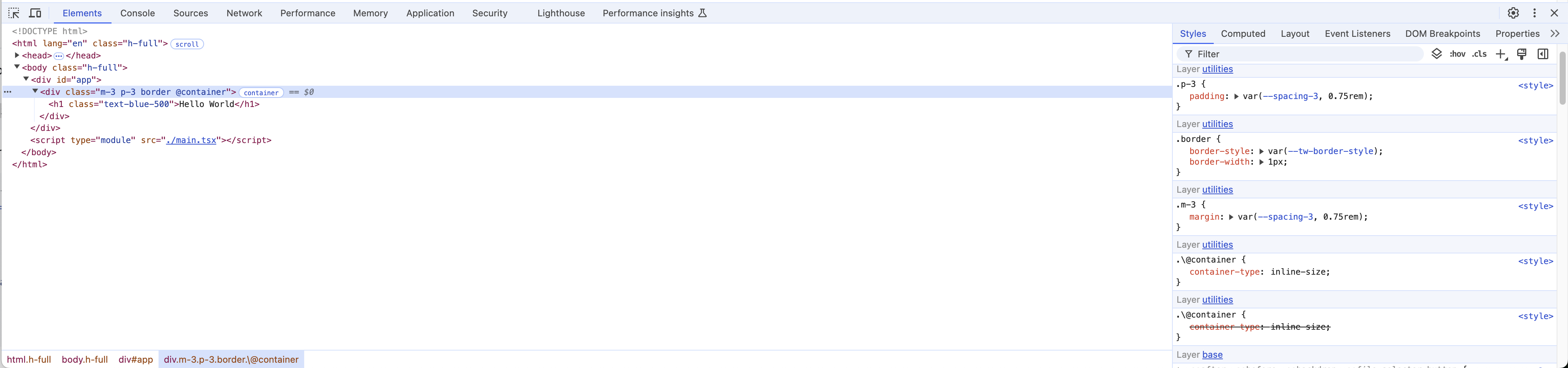
However, in order for the Vite example to load the extension, I also had
to apply the following patch:

I think this is related to our dev system though, the compiled plugin
file is going to be a flat file with no requires in our public release.
---------
Co-authored-by: Adam Wathan <adam.wathan@gmail.com>
This PR updates our default `theme.css` file and organizes the CSS
variables in a custom order that's optimized for looking nice in Chrome
dev tools.

You can only see ~50 variables "above the fold" in dev tools without
clicking "Show all", so I've opted for putting variables near the top
that have the highest "impact" on the design/brand of the site, and also
showcase some of the modern CSS features we are using in Tailwind CSS
v4.

Here's what it looks like:

<kbd><img width="957" alt="image"
src="https://github.com/user-attachments/assets/dade9244-6e22-4822-ac5c-ffa33e895f6e"></kbd>

I really want to show off the color palette because the swatches look
nice and because seeing `oklch` there feels like a nice signal for
Tailwind CSS v4 being very modern, but we have a lot of colors so you
can't really fit much else if you do this. I stuck font families at the
top since it's one of the few things that we can fit there that also
feels important to your site's brand but still has few enough values not
to push away the color palette.

Co-authored-by: Adam Wathan <4323180+adamwathan@users.noreply.github.com>
This PR adds a migration where we detect arbitrary variants and try to
upgrade them to built-in variants.

For example, if you are using `[[data-visible]]:flex`, we can convert it
to `data-visible:flex`. We can also upgrade more advanced examples such
as `has-[[data-visible]]:flex` to a compound variant which becomes
`has-data-visible:flex`.

A table of example migrations:

| Before | After |
| ------------------------------------------ |
---------------------------------- |
| `[[data-visible]]:flex` | `data-visible:flex` |
| `[&[data-visible]]:flex` | `data-visible:flex` |
| `[[data-visible]&]:flex` | `data-visible:flex` |
| `[[data-url*="example"]]:flex` | `data-[url*="example"]:flex` |
| `[[data-url$=".com"_i]]:flex` | `data-[url$=".com"_i]:flex` |
| `[[data-url$=.com_i]]:flex` | `data-[url$=.com_i]:flex` |
| `[&:is([data-visible])]:flex` | `data-visible:flex` |
| `has-[[data-visible]]:flex` | `has-data-visible:flex` |
| `has-[&:is([data-visible])]:flex` | `has-data-visible:flex` |
| `has-[[data-slot=description]]:flex` |
`has-data-[slot=description]:flex` |
| `has-[&:is([data-slot=description])]:flex` |
`has-data-[slot=description]:flex` |
| `has-[[aria-visible="true"]]:flex` | `has-aria-visible:flex` |
| `has-[[aria-visible]]:flex` | `has-aria-[visible]:flex` |

We can also convert combinators from `[&>[data-visible]]:flex` to just
`*:data-visible:flex` and `[&_[data-visible]]:flex` to
`**:data-visible:flex`.

| Before | After |
| --- | --- |
| `[&>[data-visible]]:flex` | `*:data-visible:flex` |
| `[&_>_[data-visible]]:flex` | `*:data-visible:flex` |
| `[&_[data-visible]]:flex` | `**:data-visible:flex` |

Additionally, if you have complex selectors with `:not()`, we can
convert this to a compound `not-*` variant in some cases as well:

| Before | After |
| --- | --- |
| `[&:nth-child(2)]:flex` | `nth-2:flex` |
| `[&:not(:nth-child(2))]:flex` | `not-nth-2:flex` |

If some of the values in `nth-child(…)` are a bit too complex, then we
still try to convert them but to arbitrary values instead.

| Before | After |
| --- | --- |
| `[&:nth-child(-n+3)]:flex` | `nth-[-n+3]:flex` |
| `[&:not(:nth-child(-n+3))]:flex` | `not-nth-[-n+3]:flex` |

This also implements some optimizations around `even` and `odd`:

| Before | After |
| --- | --- |
| `[&:nth-child(odd)]:flex` | `odd:flex` |
| `[&:not(:nth-child(odd))]:flex` | `even:flex` |
| `[&:nth-child(even)]:flex` | `even:flex` |
| `[&:not(:nth-child(even))]:flex` | `odd:flex` |


Some examples that stay as-is:

- `has-[&>[data-visible]]:flex` we can't upgrade this one because
`has-*` is not a valid variant.
- `has-[[data-visible][data-dark]]:flex` we can't upgrade this one
because `[data-visible][data-dark]` has to be on the same element. If we
convert this to `has-data-visible:has-data-dark:flex` then this
condition will be true if an element exists with `data-visible` and
another element exists with `data-dark` but we don't guarantee that they
are the same element.

---

Running this on the Catalyst codebase results in some updates that look
like this:

<img width="676" alt="image"
src="https://github.com/user-attachments/assets/6f0ff21d-5037-440b-9b80-0997ab0c11dd">
<img width="397" alt="image"
src="https://github.com/user-attachments/assets/8f0856fa-1709-404a-ac34-7d8c661fa799">

---------

Co-authored-by: Adam Wathan <4323180+adamwathan@users.noreply.github.com>
This PR removes the `--leading-none` variable from the default theme in
favor of making `leading-none` a static utility, since it doesn't make
sense to change the value of this on a per-project basis. This is
consistent with how `none` values work for other utilities in the
framework.

Some folks in the past have wanted `leading-none` to be `line-height: 0`
but technically "leading" is the space between lines, and `line-height:
1` removes all extra space between lines so it feels correct to me
(although it means all of the numeric utilities like `leading-6` are not
technically correct but I try hard not to think about that too much).

If someone wants `line-height: 0` they can use `leading-0` in v4 since
the `leading-*` utilities inherit the spacing scale now.

---------

Co-authored-by: Adam Wathan <4323180+adamwathan@users.noreply.github.com>
This PR deprecates the `shadow-inner` value in favor of
`inset-shadow-sm` which does the same thing but is composable with other
outer shadows.

It's still included in the default theme but is registered as `inline
reference` and doesn't add any CSS variables to the output.

---------

Co-authored-by: Adam Wathan <4323180+adamwathan@users.noreply.github.com>
This PR reintroduces the `blur`, `shadow`, `drop-shadow`, and `rounded`
utilities that were removed in #14849, just to preserve backward
compatibility as much as possible.

These values are still considered deprecated, and we register them as
`inline reference` with the theme to ensure they don't produce any CSS
variables in output:

```css
/* Deprecated */
@theme default inline reference {
  --blur: 8px;
  --shadow: 0 1px 3px 0 rgb(0 0 0 / 0.1), 0 1px 2px -1px rgb(0 0 0 / 0.1);
  --drop-shadow: 0 1px 2px rgb(0 0 0 / 0.1), 0 1px 1px rgb(0 0 0 / 0.06);
  --radius: 0.25rem;
}
```

These values won't be included in the documentation, and in the future
we'll add an option to explicitly register things as `deprecated` so
that they don't appear as completions in IntelliSense either.

Co-authored-by: Adam Wathan <4323180+adamwathan@users.noreply.github.com>




