
19 KiB
| presentation |
|---|
| true |
Brown Bag

Introducing Marko v3
Patrick Steele-Idem (Node.js Platform Team)
March 11, 2016
Marko is getting a major update!
Why Marko?
- Streaming and async rendering
- Progressive HTML rendering
- Custom tags
- Lightweight and fast
- Marko Widgets for UI components
- Clean HTML-based syntax
Marko is really fast
| Template Engine | Results |
|---|---|
| marko | 187,729 op/s (fastest) |
| dot | 183,161 op/s (2.43% slower) |
| handlebars | 104,634 op/s (44.26% slower) |
| dust | 83,773 op/s (55.38% slower) |
| swig | 54,866 op/s (70.77% slower) |
| jade | 32,929 op/s (82.46% slower) |
| nunjucks | 32,306 op/s (82.79% slower) |
| react | 3,651 op/s (98.06% slower) |
Source: https://github.com/marko-js/templating-benchmarks
Marko vs React
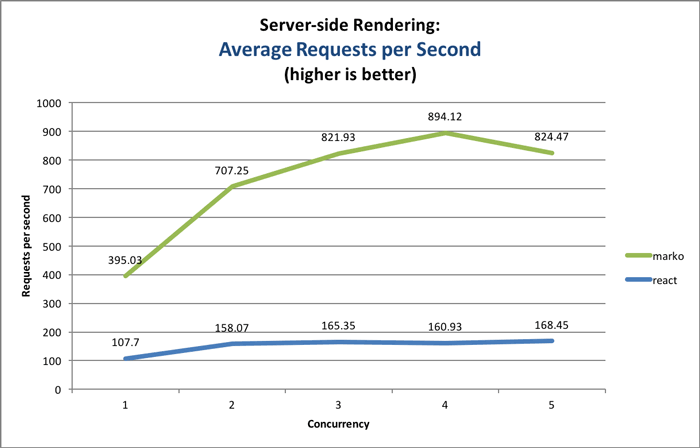
Growing Community

Marko v3 is a huge release
- 295 commits to marko
- Almost 100 commits to the new parser: htmljs-parser
- Both breaking and non-breaking changes
- Don't worry, we have a migration tool
Why is Marko changing?
- Issue #90 - Proposal: Replace HTML parser with a new parser that recognizes attribute types
- Issue #211 - Marko v3: Support concise (Jade-like) syntax
Strict HTML parser was holding Marko back
Old HTML Parser
Bad: All HTML attributes are parsed in as Strings
Separate schema files were used to add type information. :(
Solution: HTML parser that recognizes types
<div class=data.myClassName>
<input type="checkbox" checked=data.isChecked/>

<my-component string="Hello"/>
<my-component number=1/>
<my-component template-string="Hello ${name}"/>
<my-component boolean=true/>
<my-component array=[1, 2, 3]/>
<my-component object={hello: 'world'}/>
<my-component variable=name/>
<my-component function-call=data.foo()/>
<my-component complex-expression=1+2/>
<my-component super-complex-expression=(data.foo() + data.bar(['a', 'b', 'c']))/>
Marko History
XML (Raptor Templates) ➙ HTML ➙ HTML-JS
New and Improved Syntax(es)
HTML syntax
<!DOCTYPE html>
<html lang="en">
    <head>
        <title>Marko Templating Engine</title>
    </head>
    <body>
        <!-- Welcome to Marko! -->
        <app-hello name=data.name/>

        <ul if(data.colors.length)>
            <li for(color in data.colors)>
                ${color}
            </li>
        </ul>
        <div else>
            No colors!
        </div>
    </body>
</html>
Concise syntax
<!DOCTYPE html>
html lang="en"
    head
        title - Marko Templating Engine
    body
        // Welcome to Marko!
        app-hello name=data.name
        ul if(data.colors.length)
            li for(color in data.colors)
                ${color}
        div else
            - No colors!
Mixed syntax
<!DOCTYPE html>
html lang="en"
    head
        <title>Marko Templating Engine</title>
    body
        // Welcome to Marko!
        <app-hello name=data.name/>
        ul if(data.colors.length)
            li for(color in data.colors)
                ${color}
        div else
            - No colors!
Improved Editor and IDE Support
- Atom: language-marko
- Sublime Text: marko-sublime
- WebStorm: marko.tmbundle (See: Importing TextMate Bundles) (New!)
- TextMate: marko.tmbundle
- CodeMirror/Brackets
Improved syntax for directives
Macros
Old syntax:
<def function="greeting(name, count)">
    Hello ${name}! You have ${count} new messages.
</def>

<invoke function="greeting" name="John" count="${10}"/>
<invoke function="greeting('Frank', 20)"/>
New syntax:
<macro greeting(name, count)>
  Hello ${name}! You have ${count} new messages.
</macro>

<greeting name="Frank" count=30/>
<greeting('Frank', 30)/>
Macro with body content
<macro section-heading(className)>
  <h1 class=className>
    <macro-body/>
  </h1>
</macro>

<section-heading className="foo">
  Hello World!
</section-heading>

<!-- Output: -->
<h1 class="foo">Hello World!</h1>
Includes
Old syntax:
<include template="./include-target.marko" name="Frank" count="${20}"/>
<include template="./include-target.marko" template-data="{name: 'Frank', count: 20}"/>
New syntax:
<include("./include-target.marko") name='Frank' count=20/>
<include("./include-target.marko", {name: 'Frank', count: 20})/>
Conditionals (as tags)
Old syntax:
<if test="a > b">...</if>
<else-if test="b < a">...</else-if>
<else>...</else>
New syntax:
<if(a > b)>...</if>
<else-if(b < a)>...</else-if>
<else>...</else>
Conditionals (as attributes)
Old syntax:
<div if="a > b">...</div>
<div else-if="b < a">...</div>
<div else>...</div>
New syntax:
<div if(a > b)>...</div>
<div else-if(b < a)>...</div>
<div else>...</div>
for(item in items) - As tag
Old syntax:
<ul>
    <for test="color in colors"><li>${color}</li>
    </for>
</ul>
New syntax:
<ul>
    <for(color in colors)>
        <li>${color}</li>
    </for>
</ul>
for(item in items) - As attribute
Old syntax:
<ul>
    <li for="color in colors">
        ${color}
    </li>
</ul>
New syntax:
<ul>
    <li for(color in colors)>
        ${color}
    </li>
</ul>
Looping Options
<for(color in ['red', 'green', 'blue'] | separator=", ")>
    ${color}
</for>
Output:
red, green, blue
Iterator function as target
<script marko-init>
function myColorsIterator(callback) {
    callback('red');
    callback('green');
    callback('blue');
}
</script>

<ul>
    <for(color in myColorsIterator)>
        <li>${color}</li>
    </for>
</ul>
Output:
<ul>
    <li>red</li>
    <li>green</li>
    <li>blue</li>
</ul>
for(<init>; <test>; <update>)
<for(var i=1; i<=3; i++)>
    ${i}
</for>
Output:
123
for(key, value in object)
Old syntax:
<for each="(name,value) in {'foo': 'low', 'bar': 'high'}">
    ${name}: ${value}
</for>
New syntax:
<for(name,value in {'foo': 'low', 'bar': 'high'})>
    ${name}: ${value}
</for>
for(<range>)
Old syntax:
<for each="i from 0 to 9">
    ${i}
</for>
New syntax:
<for(i from 0 to 9)>
    ${i}
</for>
while(<test>)
Marko v3 now supports native while loops:
<!-- Applied as a tag: -->
<var n=0/>
<ul>
    <while(n < 4)>
        <li>${n++}</li>
    </while>
</ul>

<!-- Applied as an attribute: -->
<var n=0/>
<ul>
    <li while(n < 4)>
        ${n++}
    </li>
</ul>
Imports
Old syntax:
<require module="change-case" var="changeCase"/>
New syntax:
<script marko-init>
var reverse = require('./helpers').reverse;
var changeCase = require('change-case');
</script>
Variables
Old syntax:
<var name="foo" value="'bar'" />
<var name="count" value="0" />
<assign var="count" value="count+1" />
New syntax:
<var foo="bar" count=0/>
<assign count=count+1/>
Scoped Variables
<var name="Frank">
    Hello ${name}!
</var>
<!-- The "name" variable will be `undefined` here -->
Scriptlets
Old syntax:
{% if (true) { %}
    HELLO
{% } %}
{% if (false) { %}
    WORLD
{% } %}
New syntax:
<% console.log('Hello World'); %>

<% if (true) { %>
    HELLO
<% } %>
<% if (false) { %>
    WORLD
<% } %>
Layout taglib
Old syntax:
<layout-use template="./layout-default.marko" show-header="$false">
    <layout-put into="body">BODY CONTENT</layout-put>
    <layout-put into="footer">FOOTER CONTENT</layout-put>
</layout-use>
New syntax:
<layout-use("./layout-default.marko") show-header=false>
    <layout-put into="body">BODY CONTENT</layout-put>
    <layout-put into="footer">FOOTER CONTENT</layout-put>
</layout-use>
Invoke tag
Old syntax:
<invoke function="test('World')"/>
<invoke function="console.log('Hello World')"/>
New syntax:
<invoke test('World') />
<invoke console.log('Hello World')/>
Empty closing tag
<my-custom-tag>
    Hello world!
</>
Shorthand ID and class names
#section
    ul.colors
        li.color - red
        li.color - green
    button#submitButton.enabled - Submit Form
Output:
<div id="section">
    <ul class="colors">
        <li class="color">red</li>
        <li class="color">green</li>
        <li class="color">blue</li>
    </ul>
    <button id="submitButton" class="enabled">
        Submit Form
    </button>
</div>
The shorthand syntax also works with the more verbose HTML syntax:
<#section>
    <ul.colors>
        <li.color>red</li>
        <li.color>green</li>
        <li.color>blue</li>
    </ul.colors>
    <button#submitButton.enabled>
        Submit Form
    </button>
</>
Validating parser
<div>Hello World</foo>
You will get a friendly error message:
The closing "foo" tag does not match the corresponding opening "div" tag
Validation for JavaScript Expression
<div if(someCondition INVALID)>
    ...
</div>
Error message:
1) [template.marko:1:0] Invalid expression for if statement:

Unexpected identifier: (someCondition INVALID)
                                      ^
Style attribute
<div style={color: 'red', 'font-weight': 'bold'}>
Output:
<div style="color:red;font-weight:bold">
Class attribute
The value of the class attribute can now be an object expression or an array expression as shown below:
<!-- array: -->
<div class=['a', null, 'c']>

<!-- object: -->
<div class={a: true, b: false, c: true}>
In both cases, the output will be the same:
<div class="a c">
Dynamic attributes
Old syntax:
<div attrs="myAttrs"/>
New syntax:
<var myAttrs={'class': 'foo', 'style': 'background-color: red'}/>
<div ${myAttrs}/>
Output:
<div class="foo" style="background-color: red"></div>
Dynamic tag names
<${foo ? 'div' : 'span'}>
    Hello World!
</>
Output:
<!-- If foo is true: -->
<div>Hello World!</div>

<!-- If foo is false: -->
<span>Hello World!</span>
Input data for custom tags
<greeting({name: 'Frank'})/>

<!-- Equivalent to: -->
<greeting name='Frank' />
Tag body content parsing
The marko-body attribute can be used to control how body content is parsed. The following values are supported:
"html""static-text""parsed-text"
<div marko-body="static-text">
    This is just one
    <span if(foo)>
            Hello ${THIS IS NOT VALID}!
    </span>
    big text block
</div>
Preserve whitespace
Old syntax:
<div c-space="preserve">
    This   whitespace   will
    be preserved.
</div>
New syntax:
<div marko-preserve-whitespace>
    This   whitespace   will
    be preserved.
</div>
Compiler options
Old syntax:
<compiler-options whitespace="preserve" />
New syntax:
<marko-compiler-options preserve-whitespace preserve-comments />
Open tag only
Tag definition:
{
    "<my-custom-tag>": {
        "open-tag-only": true,
        ...
    }
}
Usage:
<!-- Allowed: -->
<my-custom-tag>
<my-custom-tag/>

<!-- Not allowed: -->
<my-custom-tag>Foo</my-custom-tag>
Improved readability of compiled code
<my-custom-tag name="World"/>

<ul if(data.colors.length)>
    <li for(color in data.colors)>
        ${color}
    </li>
</ul>
<div else>
    No colors!
</div>
function create(__helpers) {
  var str = __helpers.s,
      empty = __helpers.e,
      notEmpty = __helpers.ne,
      escapeXml = __helpers.x,
      __loadTag = __helpers.t,
      my_custom_tag = __loadTag(require("./components/my-custom-tag/renderer")),
      forEach = __helpers.f;

  return function render(data, out) {
    my_custom_tag({
        name: "World"
      }, out);

    if (data.colors.length) {
      out.w("<ul>");

      forEach(data.colors, function(color) {
        out.w("<li>" +
          escapeXml(color) +
          "</li>");
      });

      out.w("</ul>");
    } else {
      out.w("<div>No colors!</div>");
    }
  };
}

(module.exports = require("marko").c(__filename)).c(create);
Removed features
Removed: $
Use ${<variable-name>} instead.
Removed: $!
Use $!{<variable-name>} instead.
Removed: "simple conditional" syntax
Old syntax:
<div class="{?data.isActive; active; inactive}">
<div class="{?data.isActive; active}">
New syntax:
<div class=(data.isActive ? 'active' : 'inactive')>
<div class=(data.isActive && 'active')>
Removed: nested attributes
Nested attributes are no longer supported (likely never used):
<test-popover>
    <attr name="title">Popover Title</attr>
    <attr name="content">Popover Content</attr>

    Link Text
</test-popover>
Removed: <require> tag
Old syntax:
<require module="./my-include-target.marko" var="myIncludeTarget" />
New syntax:
<script marko-init>
var myIncludeTarget = require('./my-include-target.marko');
</script>
Removed: c-data/c-input attribute
Custom tag data should be passed using an argument:
<my-custom-tag({name: 'Frank'})/>
Removed: c-space/c-whitespace attribute
Use marko-preserve-whitespace attribute instead:
<div marko-preserve-whitespace>
    This whitespace
    will be preserved.
</div>
Removed: c-escape-xml attribute
No longer applicable.
Removed: c-parse-body-text attribute
Use the marko-body="<body-type>" attribute instead.
Removed: attrs attribute
Use placeholder within open tag instead:
<div ${myAttrs}>
Removed: with tag and attribute
Instead, use <var> tag with nested content to create scoped variables.
Removed: JavaScript operator aliases
The following JavaScript operator aliases are no longer supported:
| JavaScript Operator | Marko Equivalent |
|---|---|
&& |
and |
|| |
or |
=== |
eq |
!== |
ne |
< |
lt |
> |
gt |
<= |
le |
>= |
ge |
Removed: Dynamic string path for includes
var includeTemplate = require('./include.marko');

// ...

var templateData = {
    includeTarget: includeTemplate
}
<include(data.includeTarget})/>
Other notable changes
marko-taglib.json → marko.json
Nested tags separator changed
Old syntax:
<tabs>
    <tabs.tab title="Tab 1">
        Content for tab 1
    </tabs.tab>
    <tabs.tab title="Tab 2">
        Content for tab 2
    </tabs.tab>
</tabs>
New syntax:
<tabs>
    <tabs:tab title="Tab 1">
        Content for tab 1
    </tabs:tab>
    <tabs:tab title="Tab 2">
        Content for tab 2
    </tabs:tab>
</tabs>
Node.js v4+ is now required for compiling
Unlike Marko v2, Marko v3 requires Node.js v4+ to compile Marko templates. The new Marko compiler was written using ECMAScript 2015 (ES6) features that are only found in Node.js v4+. The Marko runtime, however, still works in all JavaScript runtimes.
Case-sensitive HTML parser
The Marko parser and compiler are now case sensitive. The following tags are not equal with Marko v3:
<my-custom-tag/>
<My-CUSTOM-Tag/>
Special Thanks:
@adammcarth, @BryceEWatson, @crsandeep, @DanCech, @danrichman, @kristianmandrup, @onemrkarthik, @philidem, @pswar, @scttdavs, @SunnyGurnani, @tindli, @vedam and @yomed
Thank You!
- Join the Marko community on Gitter: gitter.im/marko-js/marko
- Please help improve code, tests and docs
- Pull requests greatly appreciated!
- Please tell your friends :)