
blob-util

blob-util is a Blob library for busy people.
If you want an easy way to work with binary data in the browser, or you don't even know what a Blob is, then this is the library for you.
blob-util offers a tiny (~4KB min+gz) set of cross-browser utilities for translating Blobs to and from different formats:
<img/>tags- base 64 strings
- binary strings
- ArrayBuffers
- data URLs
It's also a good pairing with the attachment API in PouchDB.
Note: this is a browser library. For Node.js, see Buffers.
Topics:
Usage
Download it from the dist/ folder above, or use NPM:
$ npm install blob-util
or Bower:
$ bower install blob-util
Then stick it in your HTML:
<script src="blob-util.js"></script>
Now you have a window.blobUtil object. Or if you don't like globals, you can use Browserify.
Tutorial
Blobs (binary large objects) are the modern way of working with binary data in the browser. The browser support is very good.
Once you have a Blob, you can make it available offline by storing it in IndexedDB, PouchDB, LocalForage, or other in-browser databases. So it's the perfect format for working with offline images, sound, and video.
Example
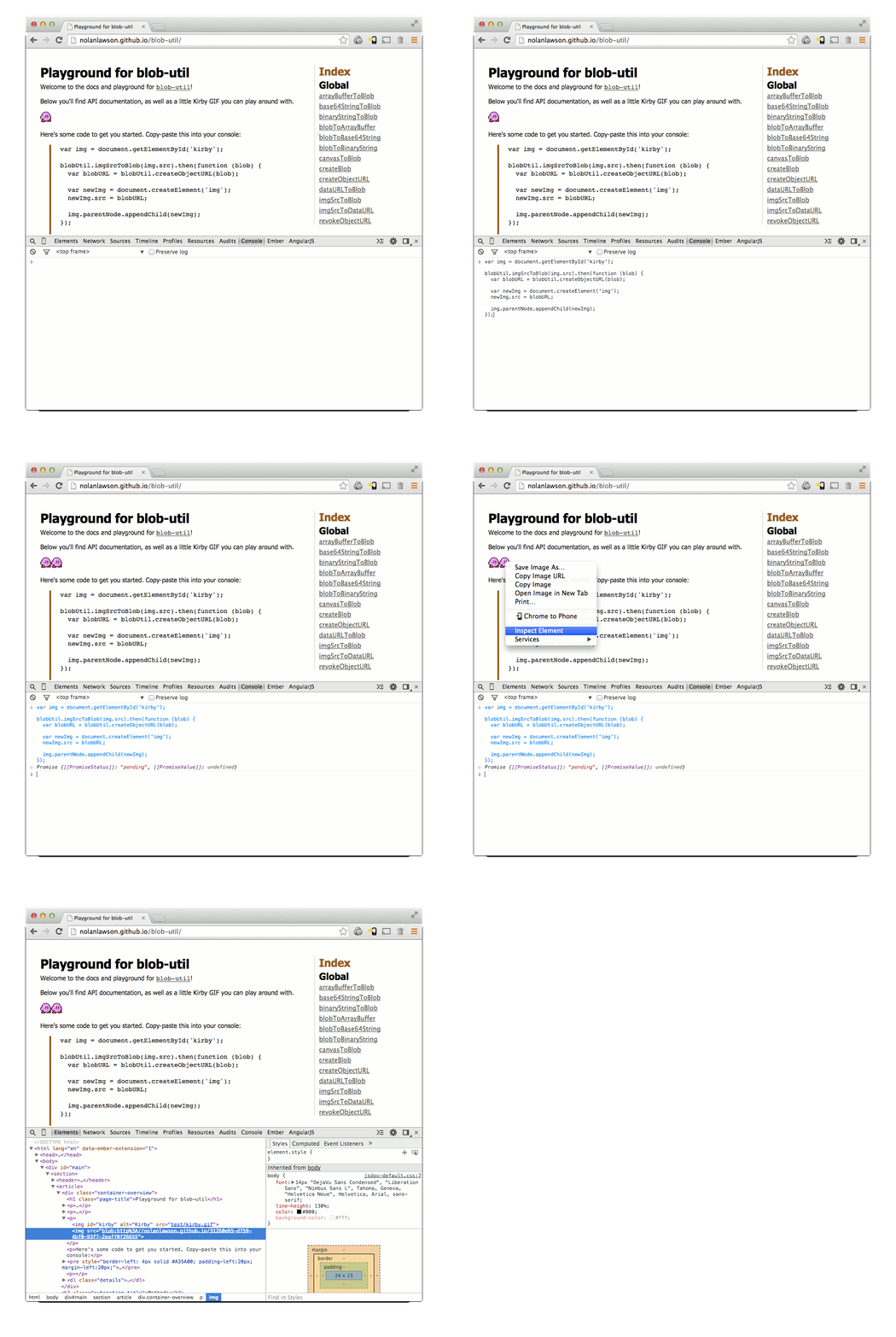
Here's Kirby. He's a famous little Blob.

So let's fulfill his destiny, and convert him to a real Blob object.
var img = document.getElementById('kirby');

blobUtil.imgSrcToBlob(img.src).then(function (blob) {
  // ladies and gents, we have a blob
}).catch(function (err) {
  // image failed to load
});
(Don't worry, this won't download the image twice, because browsers are smart.)
Now that we have a Blob, we can convert it to a URL and use that as the source for another <img/> tag:
var blobURL = blobUtil.createObjectURL(blob);

var newImg = document.createElement('img');
newImg.src = blobURL;

document.body.appendChild(newImg);
So now we have two Kirbys - one with a normal URL, and the other with a blob URL. You can try this out yourself in the blob-util playground. Super fun!
API
Warning: this API uses Promises, because it's not 2009 anymore.
###Overview
- createBlob(parts, options)
- createObjectURL(blob)
- revokeObjectURL(url)
- blobToBinaryString(blob)
- base64StringToBlob(base64, type)
- binaryStringToBlob(binary, type)
- blobToBase64String(blob)
- dataURLToBlob(dataURL)
- imgSrcToDataURL(src, type)
- canvasToBlob(canvas, type)
- imgSrcToBlob(src, type)
- arrayBufferToBlob(buffer, type)
- blobToArrayBuffer(blob)
###createBlob(parts, options)
Shim for
new Blob()
to support
older browsers that use the deprecated BlobBuilder API.
Params
- parts
Array- content of theBlob - options
Object- usually just{type: myContentType}
Returns: Blob
###createObjectURL(blob)
Shim for
URL.createObjectURL()
to support browsers that only have the prefixed
webkitURL (e.g. Android <4.4).
Params
- blob
Blob
Returns: string - url
###revokeObjectURL(url)
Shim for
URL.revokeObjectURL()
to support browsers that only have the prefixed
webkitURL (e.g. Android <4.4).
Params
- url
string
###blobToBinaryString(blob)
Convert a Blob to a binary string. Returns a Promise.
Params
- blob
Blob
Returns: Promise - Promise that resolves with the binary string
###base64StringToBlob(base64, type)
Convert a base64-encoded string to a Blob. Returns a Promise.
Params
- base64
string - type
string|undefined- the content type (optional)
Returns: Promise - Promise that resolves with the Blob
###binaryStringToBlob(binary, type)
Convert a binary string to a Blob. Returns a Promise.
Params
- binary
string - type
string|undefined- the content type (optional)
Returns: Promise - Promise that resolves with the Blob
###blobToBase64String(blob)
Convert a Blob to a binary string. Returns a Promise.
Params
- blob
Blob
Returns: Promise - Promise that resolves with the binary string
###dataURLToBlob(dataURL)
Convert a data URL string
(e.g. 'data:image/png;base64,iVBORw0KG...')
to a Blob. Returns a Promise.
Params
- dataURL
string
Returns: Promise - Promise that resolves with the Blob
###imgSrcToDataURL(src, type, crossOrigin)
Convert an image's src URL to a data URL by loading the image and painting
it to a canvas. Returns a Promise.
Note: this will coerce the image to the desired content type, and it will only paint the first frame of an animated GIF.
Params
- src
string - type
string|undefined- the content type (optional, defaults to 'image/png') - crossOrigin
string|undefined- for CORS-enabled images, set this to 'Anonymous' to avoid "tainted canvas" errors
Returns: Promise - Promise that resolves with the data URL string
###canvasToBlob(canvas, type)
Convert a canvas to a Blob. Returns a Promise.
Params
- canvas
string - type
string|undefined- the content type (optional, defaults to 'image/png')
Returns: Promise - Promise that resolves with the Blob
###imgSrcToBlob(src, type, crossOrigin)
Convert an image's src URL to a Blob by loading the image and painting
it to a canvas. Returns a Promise.
Note: this will coerce the image to the desired content type, and it will only paint the first frame of an animated GIF.
Params
- src
string - type
string|undefined- the content type (optional, defaults to 'image/png') - crossOrigin
string|undefined- for CORS-enabled images, set this to 'Anonymous' to avoid "tainted canvas" errors
Returns: Promise - Promise that resolves with the Blob
###arrayBufferToBlob(buffer, type)
Convert an ArrayBuffer to a Blob. Returns a Promise.
Params
- buffer
ArrayBuffer - type
string|undefined- the content type (optional)
Returns: Promise - Promise that resolves with the Blob
###blobToArrayBuffer(blob)
Convert a Blob to an ArrayBuffer. Returns a Promise.
Params
- blob
Blob
Returns: Promise - Promise that resolves with the ArrayBuffer
Credits
Thanks to webmodules/blob for the Blob constructor shim, and to the rest of the PouchDB team for figuring most of this crazy stuff out.
Building the library
npm install
npm run build
To generate documentation in doc/:
npm run jsdoc
or in markdown format as api.md
npm run jsdoc2md
The playground is just jsdoc with some extra text containing Kirby and the code samples and such.
So unfortunately you will need to do a manual diff to get the docs up to date. You'll need to diff:
api.mdtoREADME.mdindex.htmltodoc/global.html
Testing the library
In the browser
Run npm run dev and then point your favorite browser to http://127.0.0.1:8001/test/index.html.
The query param ?grep=mysearch will search for tests matching mysearch.
Automated browser tests
You can run e.g.
CLIENT=selenium:firefox npm test
CLIENT=selenium:phantomjs npm test
This will run the tests automatically and the process will exit with a 0 or a 1 when it's done. Firefox uses IndexedDB, and PhantomJS uses WebSQL.