mirror of
https://github.com/qishibo/AnotherRedisDesktopManager.git
synced 2026-01-18 16:12:43 +00:00

254 lines
11 KiB
Markdown
254 lines
11 KiB
Markdown
<img align="right" width="120" src="https://cdn.jsdelivr.net/gh/qishibo/img/ano-square-icon-128.png">
|
||
|
||
# Another Redis Desktop Manager
|
||
|
||
<hr/>
|
||
|
||
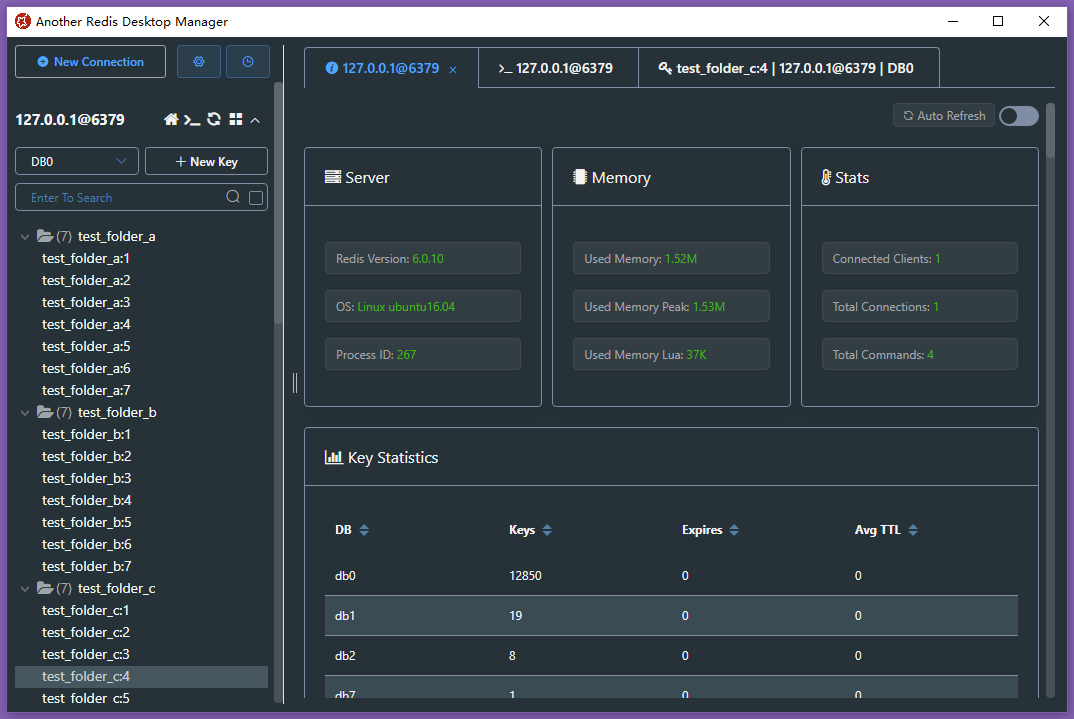
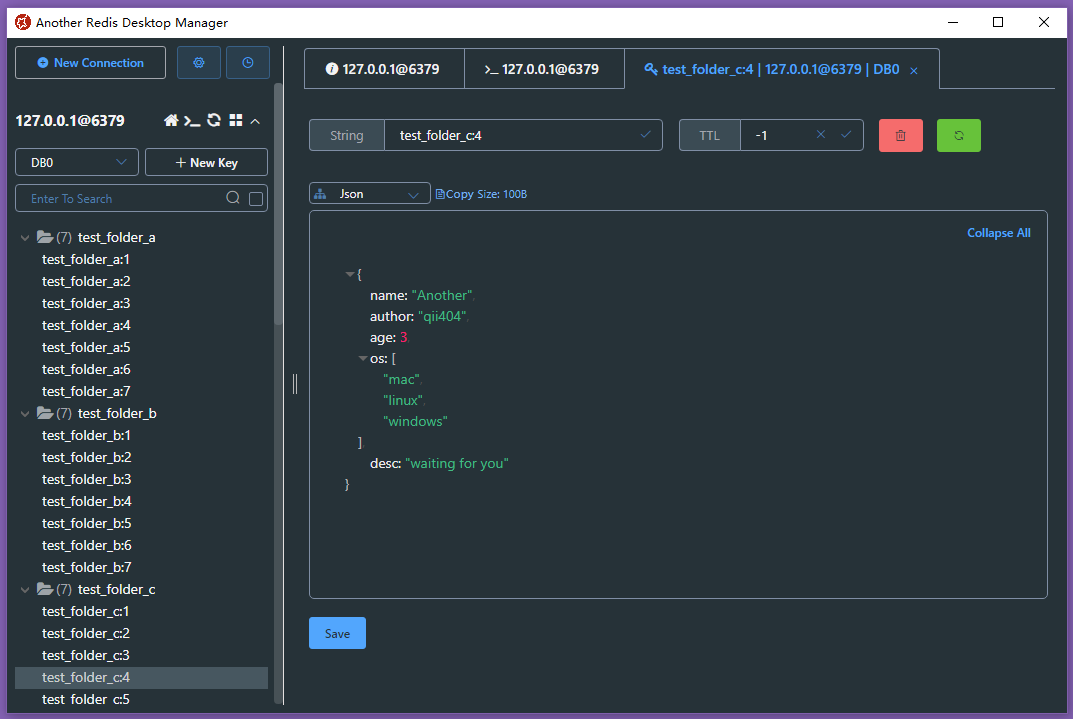
> 🚀🚀🚀 A faster, better and more stable redis desktop manager, compatible with Linux, windows, mac. What's more, it won't crash when loading massive keys.
|
||
|
||
[](LICENSE)
|
||
[](https://github.com/qishibo/AnotherRedisDesktopManager/releases)
|
||
[](https://qii404.me/github-release-statistics/?repo=/qishibo/AnotherRedisDesktopManager/)
|
||
[](https://twitter.com/qii404)
|
||
[](https://app.fossa.com/projects/git%2Bgithub.com%2Fqishibo%2FAnotherRedisDesktopManager?ref=badge_shield)
|
||
<a href="https://www.producthunt.com/posts/another-redis-desktop-manager?utm_source=badge-featured"><img src="https://api.producthunt.com/widgets/embed-image/v1/featured.svg?post_id=340552&theme=dark" height="20" width="93" /></a>
|
||
|
||
|
||
[简体中文](README.zh-CN.md)
|
||
|
||
|
||
## Windows
|
||
|
||
- Download latest [exe](https://github.com/qishibo/AnotherRedisDesktopManager/releases) package from release [or [gitee](https://gitee.com/qishibo/AnotherRedisDesktopManager/releases) in China], double click to install.
|
||
- Or by **chocolatey**: `choco install another-redis-desktop-manager`
|
||
- Or by **winget**: `winget install qishibo.AnotherRedisDesktopManager`
|
||
- Or **sponsor** by win store, It's not free, and I will be very grateful to you.
|
||
<br/><a href="https://apps.microsoft.com/store/detail/9MTD84X0JFHZ?launch=true&cid=github&mode=mini"><img src="https://cdn.jsdelivr.net/gh/qishibo/img/microsoft-store.png" height="58" width="180" alt="get from microsoft store"></a>
|
||
|
||
## Linux
|
||
|
||
- Download latest [AppImage](https://github.com/qishibo/AnotherRedisDesktopManager/releases) package from release [or [gitee](https://gitee.com/qishibo/AnotherRedisDesktopManager/releases) in China], `chmod +x`, double click to run.
|
||
- Or by **snap**: `sudo snap install another-redis-desktop-manager`
|
||
**Tips**: If permission denied when selecting private key, run `sudo snap connect another-redis-desktop-manager:ssh-keys` to give access to ~/.ssh folder.
|
||
<br/>[](https://snapcraft.io/another-redis-desktop-manager)
|
||
|
||
|
||
## Mac
|
||
|
||
> If you can't open it after installation by brew or dmg, exec the following command then reopen:<br>`sudo xattr -rd com.apple.quarantine /Applications/Another\ Redis\ Desktop\ Manager.app`
|
||
|
||
- Download latest [dmg](https://github.com/qishibo/AnotherRedisDesktopManager/releases) package from release [or [gitee](https://gitee.com/qishibo/AnotherRedisDesktopManager/releases) in China], double click to install.
|
||
- Or by **brew**: `brew install --cask another-redis-desktop-manager`
|
||
- Or **sponsor** by app store, It's not free, and I will be very grateful to you.
|
||
<br/>[](https://apps.apple.com/app/id1516451072)
|
||
|
||
<!--
|
||
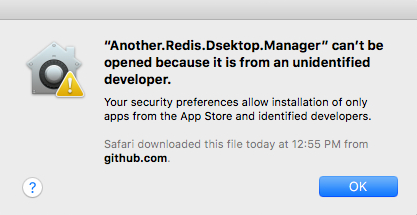
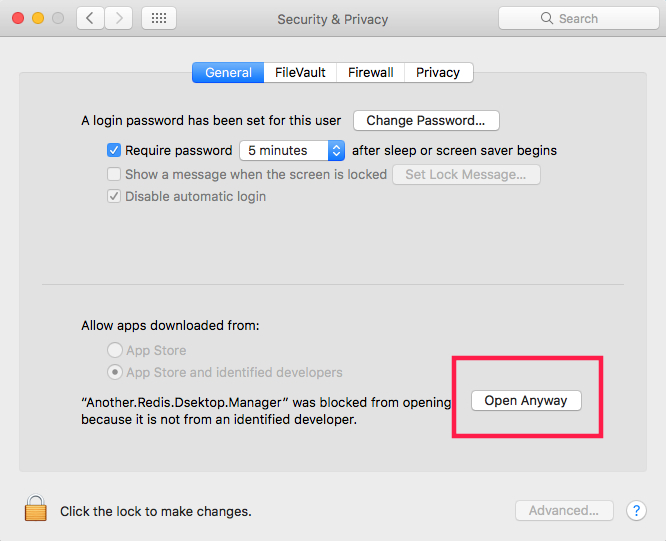
> If **Mac** warning `Another Desktop Manager can't be opened because it is from an unidentified developer`. Open `Settings->Security` and click **`Open Anyway`**
|
||
|
||
|
||
|
||
|
||
-->
|
||
|
||
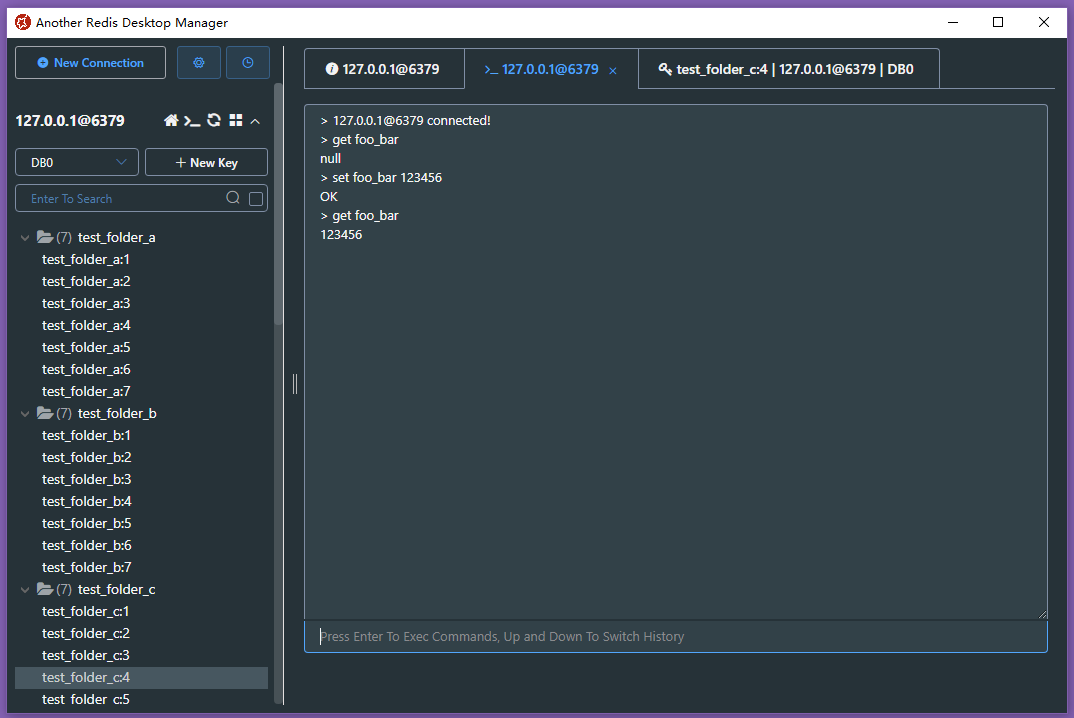
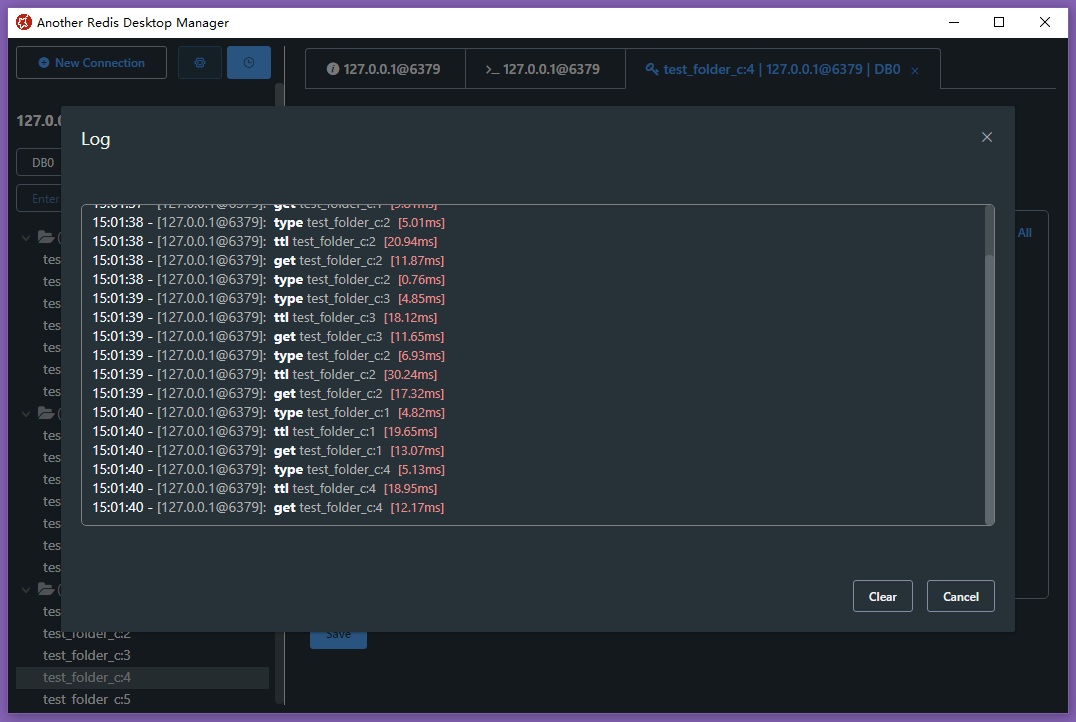
## Enjoy!
|
||
|
||
|
||
|
||
|
||
|
||
|
||
|
||
|
||
|
||
|
||
## Feature Log
|
||
|
||
- 2024-01-31: Hey, long time! Command line(CLI) args support
|
||
- 2023-06-22: Export\Import keys support
|
||
- 2023-05-26: Search support in Stream && Slow log support
|
||
- 2023-04-01: Search support in List && Deflate raw support
|
||
- 2022-10-07: Arrow Keys support in key list && Memory Analysis in folder
|
||
- 2022-08-05: Clone Connection && Tabs Contextmenu\Mousewheel Support
|
||
- 2022-04-01: Protobuf Support && Memory Analysis
|
||
- 2022-03-03: Readonly Mode && Mointor Support
|
||
- 2022-01-24: Command Dump Support
|
||
- 2022-01-05: Support To Load All Keys
|
||
- 2022-01-01: Brotli\Gzip\Deflate Support && RedisJSON Support
|
||
- 2021-11-26: JSON Editable && Subscribe Support
|
||
- 2021-08-30: Execution log Support && Add Hot Keys
|
||
- 2021-08-16: Custom Formatter View Support!
|
||
- 2021-06-30: Sentinel Support!!
|
||
- 2021-06-24: ACL Support
|
||
- 2021-05-03: Stream Support && Cli Command Tips Support
|
||
- 2021-02-28: Connection Color Tag && Search History Support
|
||
- 2021-02-03: Multiple Select\Delete && Msgpack Viewer Support
|
||
- 2020-12-30: Tree View Support!!!
|
||
- 2020-11-03: Binary View Support && SSH Passparse\Timeout Support
|
||
- 2020-09-04: SSH Cluster Support && Extension Commands Support
|
||
- 2020-06-18: SSL/TLS Support!!!
|
||
- 2020-04-28: Page Zoom && Big Key Loads With Scan && Auto Json
|
||
- 2020-04-18: Unvisible Key\Value Format Support
|
||
- 2020-04-04: Cluster Support!!!
|
||
- 2020-03-13: Dark Mode Support!!! && JsonView In Other Place
|
||
- 2020-02-16: SSH Private Key Support
|
||
- 2020-02-13: Open Cli Console In Tabs
|
||
- 2019-06-14: Custom Font-Family Support
|
||
- 2019-05-28: Key List Resizable
|
||
- 2019-05-09: Search Support In Hash List Set Zset
|
||
- 2019-04-26: Auto Updater
|
||
- 2019-04-09: SSH Tunnel Connection Support
|
||
- 2019-04-01: Extract Search Support
|
||
- 2019-02-22: Single Connection Support
|
||
- 2019-01-08: Project Start
|
||
|
||
|
||
## Dev Build
|
||
|
||
### Linux Or Mac
|
||
|
||
```bash
|
||
# clone code
|
||
git clone https://github.com/qishibo/AnotherRedisDesktopManager.git --depth=1
|
||
cd AnotherRedisDesktopManager
|
||
|
||
# install dependencies
|
||
npm install
|
||
|
||
# if download electron failed during installing, use this command
|
||
# ELECTRON_MIRROR="https://npm.taobao.org/mirrors/electron/" npm install
|
||
|
||
# serve with hot reload at localhost:9988
|
||
npm start
|
||
|
||
|
||
# after the previous step is completed to 100%, open another tab, build up a desktop client
|
||
npm run electron
|
||
```
|
||
|
||
If linux errors like this:
|
||
|
||
```bash
|
||
# if error like this
|
||
../src/FontManagerLinux.cc:1:35: fatal error: fontconfig/fontconfig.h: No such file or directory
|
||
|
||
# then try this
|
||
sudo apt install libfontconfig1-dev
|
||
```
|
||
|
||
|
||
### Windows
|
||
|
||
``` bash
|
||
# install build tools for the first time, just execute once
|
||
npm install -g windows-build-tools
|
||
|
||
# clone code
|
||
git clone https://github.com/qishibo/AnotherRedisDesktopManager.git --depth=1
|
||
cd AnotherRedisDesktopManager
|
||
|
||
# install dependencies, 32-bit or 64-bit all use win32
|
||
npm install --platform=win32
|
||
|
||
# if download electron failed during installing, use this command
|
||
# npm config set ELECTRON_MIRROR http://npm.taobao.org/mirrors/electron/
|
||
# npm install --platform=win32
|
||
|
||
# serve with hot reload at localhost:9988
|
||
npm start
|
||
|
||
|
||
# after the previous step is completed to 100%, open another tab, build up a desktop client
|
||
npm run electron
|
||
```
|
||
|
||
### Build Package
|
||
|
||
```bash
|
||
# prepare before package
|
||
npm run pack:prepare
|
||
|
||
# build package on respective platforms
|
||
# on windows build 64bit package
|
||
npm run pack:win
|
||
# on windows build 32bit package
|
||
npm run pack:win32
|
||
|
||
# on mac
|
||
npm run pack:mac
|
||
|
||
# on linux
|
||
npm run pack:linux
|
||
```
|
||
|
||
## Sponsor
|
||
|
||
- Give me a star ⭐ or upvote on [Producthunt](https://www.producthunt.com/posts/another-redis-desktop-manager)
|
||
- Through [OpenCollective](https://opencollective.com/AnotherRedisDesktopManager)
|
||
- If you are a Mac user, you can purchase this software from the [app store](https://apps.apple.com/app/id1516451072) to sponsor, and then let the app store automatically update it for you.
|
||
<br>[](https://apps.apple.com/app/id1516451072)
|
||
- If you are a Windows user, you can purchase this software from the [win store](https://www.microsoft.com/store/apps/9MTD84X0JFHZ) to sponsor.
|
||
<br>[](https://www.microsoft.com/store/apps/9MTD84X0JFHZ)
|
||
- Wechat sponsor code [Sponsor me a cup of coffee ☕]
|
||
|
||
<img width="150px" src="https://cdn.jsdelivr.net/gh/qishibo/img/202109031655807.jpeg" />
|
||
|
||
|
||
## Contributors
|
||
|
||
This project exists thanks to all the people who contribute.
|
||
[](https://github.com/qishibo/AnotherRedisDesktopManager/graphs/contributors)
|
||
[](https://opencollective.com/AnotherRedisDesktopManager)
|
||
|
||
|
||
## Custom Viewer
|
||
|
||
> When the default viewer does not meet the needs, you can format your content via customize script.
|
||
<br>Method: Pull down the viewer list to the bottom, click "Custom -> Add", and then refer to the instructions below
|
||
<br>Note: The script needs to output formatted content through `print` `console.log` `echo` etc., which can be any string or JSON string
|
||
|
||
| Config | Description |
|
||
| ------ | ------ |
|
||
| `Name` | Custom name |
|
||
| `Command` | Executable commands, such as `xxx.py` `xxx.js` `xxx.class` etc. The file needs `x` permission, which can be executed in the form of `./xxx.py`; It can also be set to `/bin/node` `/bin/bash` or other system commands, and the script path needs to be placed in Params |
|
||
| `Params` | Parameters spliced after `Command`, such as "--key `{KEY}` --value `{VALUE}`", where `{KEY}` and `{VALUE}` will be replaced with the corresponding Redis key and value. Note that if the content is invisible such as binary, you can use `{HEX}` instead of `{VALUE}`, and `{HEX}` will be replaced with the hexadecimal string |
|
||
|
||
### Configuration example:
|
||
> Add env to the first line of the script, the final executed command is: `./home/qii/pickle_decoder.py {HEX}`, the script can receive parameters via `argv[1]`
|
||
|
||
| Command | Params |
|
||
| ------ | ------ |
|
||
| `/home/qii/pickle_decoder.py` | `{HEX}` |
|
||
| `/home/qii/shell_decoder.sh` | `{VALUE}` |
|
||
|
||
### Without execute permission `x`:
|
||
> The final executed command is: `/bin/node /home/qii/node_decoder.js {HEX} --key={KEY}`, the script can receive parameters via `argv[1]`
|
||
|
||
| Command | Params |
|
||
| ------ | ------ |
|
||
| `/bin/bash` | `/home/qii/shell_decoder.sh {VALUE}` |
|
||
| `/bin/node` | `/home/qii/node_decoder.js {HEX} --key={KEY}` |
|
||
|
||
|
||
## FAQ
|
||
|
||
#### 1. How to connect to Redis Cluster in internal network (such as Docker, LAN, AWS)?
|
||
|
||
Answer: Connect via `SSH+Cluster` (SSH to the internal network and then connecting to Cluster with internal IP such as `127.0.0.1`, `192.168.x.x`), you need to fill Redis Host with the internal IP.
|
||
|
||
How to get Redis internal IP? Connect through SSH, uncheck Cluster option, and then open the console to execute `CLUSTER NODES`, select any IP in the result.
|
||
|
||
#### 2. Do I need to fill in the 'Username' in the Redis configuration?
|
||
|
||
Answer: The access control list (ACL) is only supported in `Redis>=6.0`, so do not fill it unless you need a special user.
|
||
|
||
|
||
## License
|
||
|
||
[MIT](LICENSE)
|
||
|
||
|
||
## Support
|
||
|
||
[goanother.com](https://goanother.com/) [Producthunt](https://www.producthunt.com/posts/another-redis-desktop-manager) [Twitter@shibo](https://twitter.com/qii404) [Download Analysis](https://qii404.me/github-release-statistics/?repo=/qishibo/AnotherRedisDesktopManager/)
|
||
|