
ngraph.path
Fast path finding in graphs.
usage
Basic usage
This is a basic example, which finds a path between arbitrary two nodes in arbitrary graph
let path = require('ngraph.path');
let pathFinder = path.aStar(graph);

// now we can find a path between two nodes:
let fromNodeId = 40;
let toNodeId = 42;
let foundPath = pathFinder.find(fromNodeId, toNodeId);
// foundPath is array of nodes in the graph
Example above works for any graph, and it's equivalent to unweighted Dijkstra's algorithm.
Weighted graph
Let's say we have the following graph:
let createGraph = require('ngraph.graph');
let graph = createGraph();

graph.addLink('a', 'b', {weight: 10});
graph.addLink('a', 'c', {weight: 10});
graph.addLink('c', 'd', {weight: 5});
graph.addLink('b', 'd', {weight: 10});
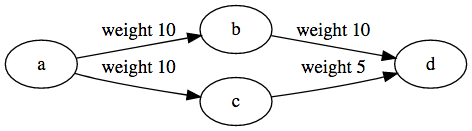
We want to find a path with the smallest possible weight:
var pathFinder = aStar(graph, {
  // We tell our pathfinder what should it use as a distance function:
  distance(fromNode, toNode, link) {
    // We don't really care about from/to nodes in this case,
    // as link.data has all needed information:
    return link.data.weight;
  }
});
let path = pathFinder.find('a', 'd');
This code will correctly print a path: d <- c <- a.
Guided (A-Star)
When pathfinder searches for a path between two nodes it considers all neighbors of a given node without any preference. In some cases we may want to guide pathfinder and tell it our preferred exploration direction.
For example, when each node in a graph has coordinates, we can assume that nodes that are closer towards the path-finder's target should be explored before other nodes.
let createGraph = require('ngraph.graph');
let graph = createGraph();

// Our graph has cities:
graph.addNode('NYC', {x: 0, y: 0});
graph.addNode('Boston', {x: 1, y: 1});
graph.addNode('Philadelphia', {x: -1, y: -1});
graph.addNode('Washington', {x: -2, y: -2});

// and railroads:
graph.addLink('NYC', 'Boston');
graph.addLink('NYC', 'Philadelphia');
graph.addLink('Philadelphia', 'Washington');
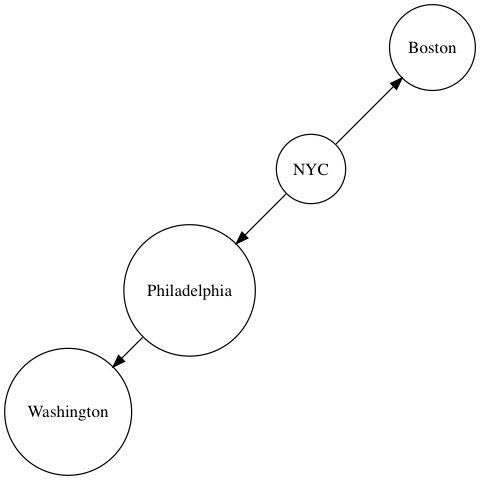
When we build the shortest path from NYC to Washington, we want to tell the pathfinder that it should prefer Philadelphia over Boston.
var pathFinder = aStar(graph, {
  distance(fromNode, toNode) {
    // In this case we have coordinates. Lets use them as
    // distance between two nodes:
    let dx = fromNode.data.x - toNode.data.x;
    let dy = fromNode.data.y - toNode.data.y;

    return Math.sqrt(dx * dx + dy * dy);
  },
  heuristic(fromNode, toNode) {
    // this is where we "guess" distance between two nodes.
    // In this particular case our guess is the same as our distance
    // function:
    let dx = fromNode.data.x - toNode.data.x;
    let dy = fromNode.data.y - toNode.data.y;

    return Math.sqrt(dx * dx + dy * dy);
  }
});
let path = pathFinder.find('NYC', 'Washington');
With this simple heuristic our algorithm becomes smarter and faster.
It is very important that our heuristic function does not overestimate actual distance between two nodes. If it does so, then algorithm cannot guarantee the shortest path.
TODO: expand on this section
license
MIT