# Marko vs React: An In-depth Look
> This article was published March 2017. Both frameworks have gone through several updates since. You can find the original ["Marko vs React: An In-depth Look" article here](https://hackernoon.com/marko-vs-react-an-in-depth-look-767de0a5f9a6)!
In this article we will take an in-depth look at the differences and
similarities between [Marko](https://markojs.com/) and React from the perspective
of the maintainers of Marko.
On the surface, Marko and React have a lot in common and both are trying to
solve very similar problems. Specifically, both Marko and React allow developers
to build web applications based on UI components and both free developers from
having to write code to manually update the DOM. While many of the features in
Marko were inspired by React, Marko and React offer very different usability and
performance characteristics. Marko was designed to avoid almost all boilerplate
and is more closely aligned with HTML. In almost all cases, a Marko UI component
will require less lines of code than its React JSX equivalent while maintaining
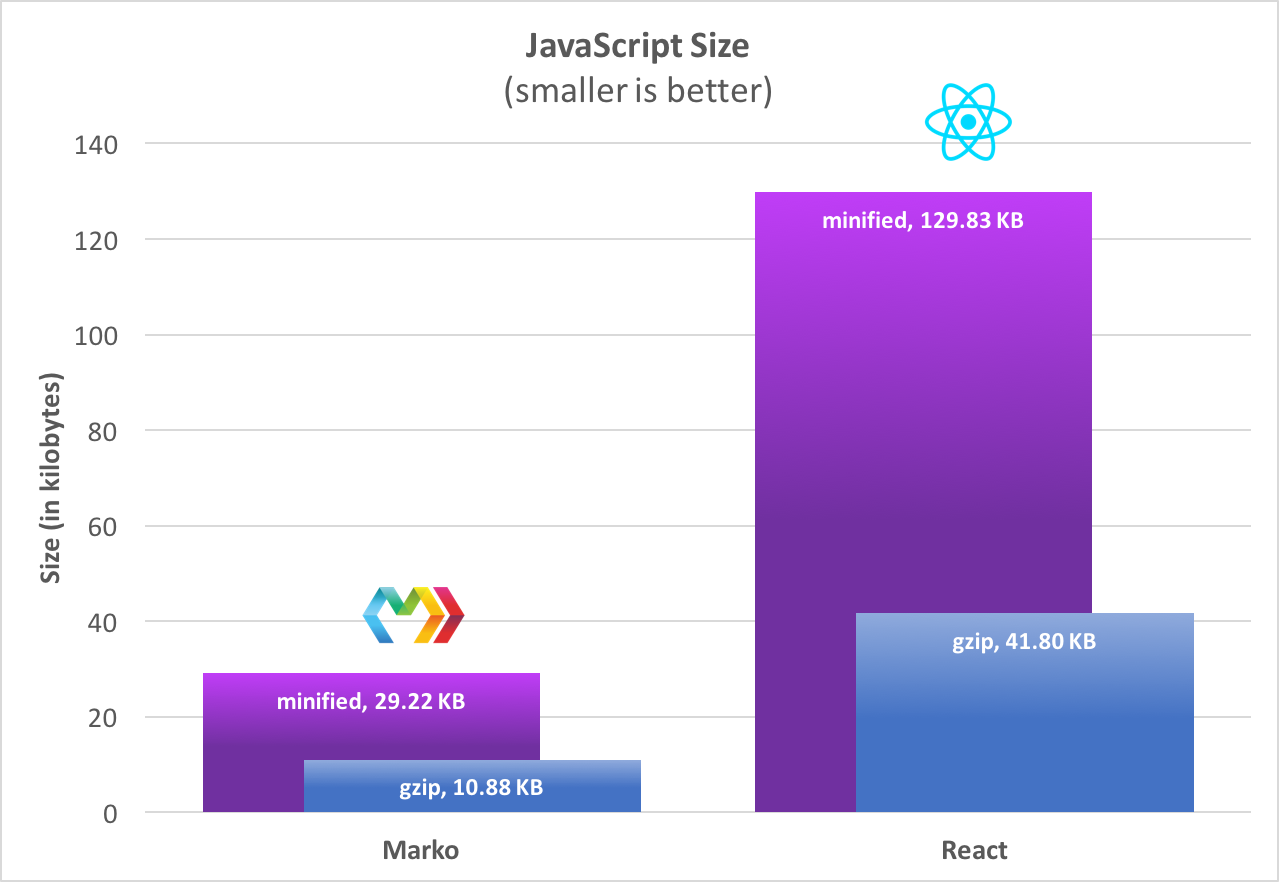
readability and allowing the same expressiveness as JSX. In addition, Marko is
highly optimized for use on the server and in the browser and has a much smaller
weight:
Because the Marko JavaScript library is much smaller than React, it will require
less time to load and parse and this will drastically improve page load times on
slow connections or on older devices. Based on [our
benchmarks](https://markojs.com/#benchmarks), Marko consistently outperforms
React by a significant margin on both the server and in the browser.
### Example
The following code highlights some of the differences between Marko and React
JSX using a somewhat contrived UI component as an example:
#### React JSX
```jsx
class Counter extends React.Component {
constructor(props) {
super(props);
this.state = { count: 0 };
}
increment(delta) {
this.setState({ count: this.state.count + delta });
}
render() {
const count = this.state.count;
let countClassName = "count";
if (count > 0) {
countClassName += " positive";
} else if (count < 0) {
countClassName += " negative";
}
return (
{count}
);
}
}
```
[▶ Try Online](https://codepen.io/mlrawlings/pen/wJXOWR?editors=0010)
#### Marko
```marko
class {
onCreate() {
this.state = { count: 0 };
}
increment(delta) {
this.state.count += delta;
}
}
$ var count = state.count;
0,
negative: count < 0
}>
${count}
```
[▶ Try
Online](https://markojs.com/try-online/?gist=8fe46bc5866605aca0dfeec202604011)
### Similarities
Marko and React have the following in common:
- UI component-based
- JavaScript and HTML markup can be intertwined
- No restrictions on JavaScript (use ES5 or ES2015+, your choice)
- Virtual DOM rendering in the browser
- DOM diffing/patching is used to reconcile views
- Both support keyed element matching
- UI components can have input properties
- UI components can have internal state
- Changes to state trigger an asynchronous update to the DOM
- Updates to the DOM are batched
- Compatible with central application state stores such as Redux and MobX
- UI components can be embedded using custom tags
- Declarative event binding (no `domEl.addEventListener()` needed)
- Support for all DOM events
- Event delegation utilized internally for DOM events that bubble
- IE9+ support
- Similar lifecycle events for UI components
- JSX and Marko both compile to JavaScript
### Differences
At a high level here are some differences:
#### Differences in rendering
- **Improved performance:** Marko renders to a virtual DOM in the browser and
directly to an HTML stream on the server (Marko supports multiple compilation
targets).
- **Improved performance:** Marko supports asynchronous rendering with [early
flushing of
HTML](https://tech.ebayinc.com/engineering/async-fragments-rediscovering-progressive-html-rendering-with-marko/)
for improvements in actual and perceived page load times.
- **Improved performance:** React requires an additional client-side re-render if
a page is initially rendered on the server while Marko does not.
- **Improved ease of use:** Marko automatically serializes UI component state and
input down to the browser so that the browser can pick up right where the server
left off.
- **Improved ease of use:** Marko is suitable for rendering an entire HTML page on
the server with support for tags such as `` and ``
#### Differences in syntax
- **Improved ease of use:** Marko uses the
[HTML-JS](https://markojs.com/docs/syntax/) syntax and the
[JSX](https://facebook.github.io/react/docs/jsx-in-depth.html) syntax is offered
for React.
- **Improved ease of use:** Marko supports both a concise syntax and a familiar
HTML syntax.
- **Improved ease of use:** JSX requires strict XML while Marko aligns with less
strict HTML that web developers are used to.
- **Improved ease of use:** With Marko, _all_ HTML attribute values are parsed as
JavaScript expressions.
- **Improved ease of use:** Marko supports simple directives for conditionals,
looping, etc.
- **JSX limitation:** JSX is “just JavaScript” but requires expressions that
preclude the usage of JavaScript statements such as in certain places.
#### Differences in compilation
- **Improved performance:** Marko supports multiple compilation outputs (Marko
VDOM and HTML streaming are currently supported).
- **Improved ease of use:** Marko compiles UI components to JavaScript modules
that export a rendering API.
- **Expanded capabilities:** Marko supports a robust API for controlling how
custom tags and custom attributes get compiled and it supports compile-time
transforms based on a friendly Abstract Syntax Tree (AST).
- **Improved performance:** JSX is just syntactic sugar that translates elements
to `createElement()` function calls while the Marko compiler has full control over how things are
compiled and optimized.
- **Improved ease of use:** React requires all UI components to be explicitly
imported before they can be used as custom tags while Marko supports both
explicit importing and implicit importing.
- **Improved performance:** Marko has a modular runtime and the compiler generates
code that only imports the parts of the Marko runtime that are needed for much
smaller builds.
- **Improved ease of use:** Marko supports optional compile-time checks to ensure
that only allowed attributes are passed to custom tags. (React `PropTypes` only provide
validation at render-time)
- **Improved ease of use:** Marko validates _all_ tag names at compile-time.
- **Improved ease of use:** Marko provides its own compiler that integrates with
Node.js and JavaScript module bundlers while React JSX requires babel and custom
babel transforms.
#### Differences in UI components
- **Reduced boilerplate:** No explicit extending of JavaScript classes in Marko
(in contrast to `class Counter extends React.Component` in React).
- **Improved ease of use:** Modifications to UI component state are synchronous
with Marko while [the rules for React are more
complicated](https://facebook.github.io/react/docs/state-and-lifecycle.html#state-updates-may-be-asynchronous).
- **Improved ease of use:** Marko watches UI component state objects to allow
state to be modified directly (e.g., `this.state.count++`).
- **Improved ease of use:** Marko supports single-file UI components combining
JavaScript behavior, CSS styling (with support for CSS preprocessors) and HTML
markup. (React requires using one of the many [CSS in JS
solutions](https://github.com/MicheleBertoli/css-in-js) if you want styles in
the same file as your component and there is no standard in the community)
- **Improved maintainability:** Marko supports a seamless transition from a
single-file UI component to a multi-file UI component.
- **Improved performance:** Marko assumes UI components are pure by default and
skips re-rendering when input properties and state are unchanged (React requires
extending
[React.PureComponent](https://facebook.github.io/react/docs/react-api.html#react.purecomponent)).
#### Differences in event systems
- **Reduced complexity:** React utilizes [synthetic
events](https://facebook.github.io/react/docs/events.html) while Marko utilizes
real DOM events.
- **Improved ease of use:** Custom events are emitted using the [EventEmitter
API](https://nodejs.org/api/events.html) in Marko (e.g., `this.emit('myCustomEvent', arg1, arg2)`).
- **Improved ease of use:** Marko has a consistent approach for listening to both
native DOM events and custom events.
- **Improved ease of use:** React requires passing around `Function` references for custom
events while Marko automatically delegates emitted custom events to event
handler methods on components.
- **Improved ease of use:** Marko provides a simple mechanism for binding
additional arguments to event handler methods and `this` will be the component
instance.
#### Differences in compatibility
- **Marko limitation:** Marko has no support for native mobile similar to React
Native (although with Marko VDOM rendering, this is possible).
- **Marko limitation:** Marko requires a JavaScript module bundler (such as
[Lasso](https://markojs.com/docs/lasso/),
[Webpack](https://markojs.com/docs/webpack/),
[Rollup](https://markojs.com/docs/rollup/)
since Marko UI components compile down to JavaScript modules. (we consider using
a JavaScript module bundler a best practice)
---
In the sections below we will take a closer look at some of the differences
between Marko and React.
### Syntax
Both Marko and React JSX allow HTML markup and JavaScript to be combined into a
single file and both support building web applications based on UI components.
Marko utilizes an [HTML-JS syntax](https://markojs.com/docs/syntax/) while most
React apps use the JSX syntax.
> React JSX makes JavaScript more like HTML and Marko makes HTML more like
> JavaScript.
In the end, both Marko and React allow JavaScript and HTML to be intertwined.
### Syntax: attributes
#### React JSX
In React JSX, all attribute values are parsed as string values unless `{}` is used.
```jsx
Hello
```
#### Marko
With Marko, _all_ attribute values are parsed as JavaScript expressions. The
following Marko code is equivalent to the React JSX code above:
```marko
Hello
```
### Syntax: inline JavaScript
#### React JSX
React JSX starts with JavaScript and allows XML elements to be inlined as shown
below:
```jsx
import { formatDate } from "./util";
function formatName(person) {
return person.firstName + " " + person.lastName.charAt(0) + ".";
}
export default function HelloMessage(props) {
var person = props.person;
return (
Hello {formatName(person)}!
You were born on {formatDate(person.birthday)}.
);
}
```
#### Marko
Marko starts out in HTML, but it allows JavaScript to be inlined in a clean and
maintainable way. Unlike other template languages, Marko aims to allow the full
power of JavaScript. The following Marko code is equivalent to the React JSX
code above:
```marko
import { formatDate } from './util';
static function formatName(person) {
return person.firstName + ' ' + person.lastName.charAt(0) + '.';
}
$ var person = input.person;
Hello ${formatName(person)}!
You were born on ${formatDate(person.birthday)}.
```
Lines prefixed with `$` are directly added to the compiled JavaScript output inside
the compiled `render()` function (for JavaScript code that should run for every render).
Lines prefixed with `static` are directly added to the compiled JavaScript output
outside the `render()` function (for code that should only run _once_ when the template is
loaded).
### Syntax: HTML support
With Marko any valid HTML markup can be used inside a Marko template. This is
not the case with React. The following quote is from the [React
documentation](https://facebook.github.io/react/docs/introducing-jsx.html#specifying-children-with-jsx):
> **Caveat:**
> Since JSX is closer to JavaScript than HTML, React DOM uses `camelCase` property naming
> convention instead of HTML attribute names.
> For example, `class` becomes `className` in JSX, and `tabindex` becomes `tabIndex`.
As a result of this caveat for React, [tools for converting HTML to JSX
exist](https://magic.reactjs.net/htmltojsx.htm).
#### React JSX
```jsx
Hello
```
#### Marko
```marko
Hello
```
### Syntax: conditionals
JSX is syntactic sugar on top of JavaScript, but it requires expressions, so
simple things like an `if/else/for` statement don’t work on their own within a JSX element. As
a result, you must either use a ternary expression, an immediately invoked
function expression, function call expression, or the experimental `do {}` expression
(stage 0 at the time of writing). This is not an issue for Marko, and tags
such as `if()` and `for` can be used anywhere as shown below:
#### React JSX
```jsx
function counterMessage(count) {
return (
(function() {
if (count < 0) {
return
Count is negative
} else if (count === 0) {
return
Count is zero
} else {
return
Count is positive
}
}())
)
}
```
#### Marko
```marko
Count is negative
Count is zero
Count is positive
```
Marko also allows directives to be used as attributes for a more condensed
template:
```marko
```
### Syntax: HTML shorthand
```marko
```
Marko supports a shorthand based on CSS selectors for less code.
React does not support these helpful shorthands.
### Syntax: concise
Marko supports a concise syntax that drops angled brackets and ending tags in
favor of indentation. Here’s how the Marko syntax options compare:
#### Marko HTML syntax
```marko
${color}
```
#### Marko concise syntax
```marko
ul
for|color| of=colors
li -- ${color}
```
#### Marko mixed syntax
```marko
ul
for|color| of=colors
${color}
```
The HTML syntax and the concise syntax can be used together:
#### React JSX
React does not offer a concise syntax.
### Components
Marko starts with simple HTML and allows UI component logic to easily be layered
on top.
#### React JSX
A React UI component is typically implemented as a class that extends `ReactComponent`:
```jsx
class HelloMessage extends React.Component {
render() {
return
Hello {this.props.name.toUpperCase()}
;
}
}
```
React also supports a more concise functional component:
```jsx
function HelloMessage(props) {
return
Hello {props.name.toUpperCase()}
;
}
```
However, if state or lifecycle events are needed then a functional UI component
must be converted to a class component:
```jsx
class HelloMessage extends React.Component {
componentDidMount() {
// ...
}
render() {
return
Hello {this.props.name.toUpperCase()}
;
}
}
```
#### Marko
Here is the same component in Marko:
```marko
Hello ${input.name.toUpperCase()}
```
Behavior can easily be added to any Marko UI component:
```marko
class {
onMount() {
// ...
}
}
Hello ${input.name.toUpperCase()}
```
Marko also allows JavaScript behavior, CSS styling and HTML markup to be
embedded in the Marko template as a single file UI component:
```marko
class {
onMount() {
// ...
}
}
style.less {
.hello {
color: red;
}
}
Hello ${input.name.toUpperCase()}
```
### API
Marko compiles components to JavaScript modules that export their rendering APIs,
as shown below:
```js
import Greeting from "./components/greeting.marko";
Greeting.renderSync({ name: "Frank" }).appendTo(document.body);
```
The same UI component can render to streams, such as a writable HTTP
response stream:
```js
import Greeting from "./components/greeting.marko";
Greeting.render({ name: "John" }, res);
```
> The users of a Marko UI component do not need to know that the component was
> implemented using Marko.
Contrast this with React as an example:
```jsx
import ReactDOM from "react-dom";
ReactDOM.render(
,
document.getElementById("container"),
);
```
On top of that, React requires that a different module be imported to render the
exact same UI component on the server:
```jsx
import ReactDOMServer from "react-dom/server";
var html = ReactDOMServer.renderToString();
```
### Custom tags
#### React JSX
With React, all custom tags for UI components must be explicitly imported:
```jsx
import Hello from "./components/Hello";
import GoodBye from "./components/GoodBye";
export default function HelloGoodBye(props) {
return (
);
}
```
#### Marko
Marko supports a mechanism for [automatically discovering custom
tags](https://markojs.com/docs/custom-tags/#discovering-tags) for UI components
based on the project directory structure. Marko walks up the directory tree to
discover all directories and it will also automatically discover custom tags
exported by installed packages. This approach negates the need for explicitly
importing a custom tag to reduce the amount of code needed in a Marko template.
For example given the following directory structure:
```
.
├── components/
│ ├── hello.marko
│ └── good-bye.marko
└── index.marko
```
The `` tag and the `` tag nested below the `components/`
directory will automatically be made available to the `index.marko` at the root:
```marko
```
This approach also allows editors and IDEs to offer autocompletion for custom
tags.
### Async
Even after rendering has started, Marko allows parts of the view to be rendered
asynchronously using the [``](https://markojs.com/docs/core-tags#await)
tag as shown in the following Marko template:
```marko
import fsp from 'fs-promise';
$ var filePath = __dirname + '/hello.txt';
$ var readPromise = fsp.readFile(filePath, {encoding: 'utf8'});
<@then|helloText|>
${helloText}
@then>
```
### Compiler
Marko compiles a template differently based on whether or not it will be used on
the server or in the browser. For example, given the following template:
```marko
Hello ${input.name}!
```
#### Compiled for the server:
```js
var marko_template = require("marko/html").t(__filename),
marko_helpers = require("marko/runtime/html/helpers"),
marko_escapeXml = marko_helpers.x;
function render(input, out) {
out.w("
Hello " + marko_escapeXml(input.name) + "!
");
}
```
#### Compiled for the browser:
```js
var marko_template = require("marko/vdom").t(__filename);
function render(input, out) {
out.e("DIV", null, 3).t("Hello ").t(input.name).t("!");
}
```
### Compile-time code transforms
The Marko compiler was built to support compile-time code generators for custom
tags and it also provides support for compile-time transforms. While Babel
allows code transformations of JavaScript, the Marko compiler provides support
for resolving custom tags declaratively and the Marko AST provides for very
powerful and simple transformations as shown in the following code for rendering
Markdown to HTML at _compile-time_:
**components/markdown/code-generator.js:**
```js
import marked from "marked";
import { removeIndentation } from "./util";
export default function generateCode(el, codegen) {
var bodyText = removeIndentation(el.bodyText);
var html = marked(bodyText);
var builder = codegen.builder;
return builder.html(builder.literal(html));
}
```
The `` tag can then be used as shown below:
```marko
> This section demonstrates Markdown in Marko
# Marko is awesome!
- High performance
- Small
- Intuitive
```
In this example, after the template is compiled, the
[marked](https://github.com/chjj/marked) library is no longer needed at
render-time.
### Tools
Marko and React offer a variety of developer tools. The [Marko developer
tools](https://github.com/marko-js/marko-devtools) are constantly evolving, but
Marko currently provides tools for unit testing UI components, precompiling `.marko`
files and generating configuration-less apps (similar to
[create-react-app](https://github.com/facebookincubator/create-react-app)).
Currently, there are no Marko developer tools that integrate with the browser,
but this is something we would like to see in the future. We will go into more
detail on the Marko developer tools in a future post.
#### IDE and editor support
Marko offers syntax highlighting across all major IDEs and editors, as well as
on GitHub. Marko provides first-class support for the Atom editor with syntax
highlighting,
[Autocomplete](https://github.com/marko-js/atom-language-marko#autocomplete) for
both HTML and custom tags,
[Hyperclick](https://github.com/marko-js/atom-language-marko#hyperclick) to
quickly jump to referenced files and methods, and [Pretty
printing](https://github.com/marko-js/atom-language-marko#prettyprint) to keep
your code readable.
---
### Why Marko?
Here are just a few reasons you should consider using
[Marko](https://markojs.com/) over React:
- Marko requires much less boilerplate.
- Marko has much better performance based on our benchmarks.
- Marko offers a clean and powerful syntax that aligns with HTML while also
allowing the full power of JavaScript.
- Marko has much less complexity and a very small runtime.
- Marko has a much lower page weight for faster page loads.
- Marko has strong integrations with Node.js.
- Marko allows for extremely powerful IDE and editor plugins (see the [Marko
plugin for Atom](https://github.com/marko-js/atom-language-marko) as an
example).
- Marko has a powerful compiler that allows new features to be added without
introducing bloat.
- eBay relies heavily on Marko and it is being used to build ebay.com (including
the mobile web).
- Marko has a strong and growing community on
[GitHub](https://github.com/marko-js/marko) and in
[Discord](https://discord.gg/RFGxYGs).
Interested in learning more about Marko? If so, you can get additional
information on the [Marko website](https://markojs.com/). Join the conversation
and contribute on [GitHub](https://github.com/marko-js/marko) and follow us on
[Twitter](https://twitter.com/MarkoDevTeam).