blob-util [](https://travis-ci.org/nolanlawson/blob-util)
=====
`blob-util` is a [Blob](https://developer.mozilla.org/en-US/docs/Web/API/Blob?redirectlocale=en-US&redirectslug=DOM%2FBlob) library for busy people.
It offers a tiny (~3.5KB min+gz) set of cross-browser utilities for translating Blobs to and from different formats:
* `` tags
* base 64 strings
* binary strings
* ArrayBuffers
* data URLs
* canvas
It's also a good pairing with the attachment API in [PouchDB](http://pouchdb.com).
**Note**: this is a browser library. For Node.js, see [Buffers](http://nodejs.org/api/buffer.html).
**Topics**:
* [Install](#usage)
* [Browser support](#browser-support)
* [Tutorial](#tutorial)
* [Playground](http://nolanlawson.github.io/blob-util)
* [API](#api)
Install
------
Download it from the `dist/` folder above, or use NPM:
```bash
$ npm install blob-util
```
or Bower:
```bash
$ bower install blob-util
```
Then stick it in your HTML:
```html
```
Now you have a `window.blobUtil` object. Or if you don't like globals, you can use Browserify.
Browser support
-----
* Firefox
* Chrome
* IE 10+
* Safari 6+
* iOS 6+
* Android 4+
* Any browser with either `Blob` or the older `BlobBuilder`; see [caniuse](http://caniuse.com/#search=blob) for details.
Tutorial
--------
Blobs (binary large objects) are the modern way of working with binary data in the browser. The browser support is [very good](http://caniuse.com/#search=blob).
Once you have a Blob, you can make it available offline by storing it in [IndexedDB](http://www.w3.org/TR/IndexedDB/), [PouchDB](http://pouchdb.com/), [LocalForage](https://mozilla.github.io/localForage/), or other in-browser databases. So it's the perfect format for working with offline images, sound, and video.
A [File](https://developer.mozilla.org/en-US/docs/Web/API/File) is also a Blob. So if you have an `` in your page, you can let your users upload any file and then work with it as a Blob.
### Example
Here's Kirby. He's a famous little Blob.
So let's fulfill his destiny, and convert him to a real `Blob` object.
```js
var img = document.getElementById('kirby');
blobUtil.imgSrcToBlob(img.src).then(function (blob) {
// ladies and gents, we have a blob
}).catch(function (err) {
// image failed to load
});
```
(Don't worry, this won't download the image twice, because browsers are smart.)
Now that we have a `Blob`, we can convert it to a URL and use that as the source for another `` tag:
```js
var blobURL = blobUtil.createObjectURL(blob);
var newImg = document.createElement('img');
newImg.src = blobURL;
document.body.appendChild(newImg);
```
So now we have two Kirbys - one with a normal URL, and the other with a blob URL. You can try this out yourself in the [blob-util playground](http://nolanlawson.github.io/blob-util). Super fun!
API
-------
Warning: this API uses [Promises](https://promisesaplus.com/), because it's not 2009 anymore.
###Overview
* [createBlob(parts, options)](#createBlob)
* [createObjectURL(blob)](#createObjectURL)
* [revokeObjectURL(url)](#revokeObjectURL)
* [blobToBinaryString(blob)](#blobToBinaryString)
* [base64StringToBlob(base64, type)](#base64StringToBlob)
* [binaryStringToBlob(binary, type)](#binaryStringToBlob)
* [blobToBase64String(blob)](#blobToBase64String)
* [dataURLToBlob(dataURL)](#dataURLToBlob)
* [imgSrcToDataURL(src, type, crossOrigin, quality)](#imgSrcToDataURL)
* [canvasToBlob(canvas, type, quality)](#canvasToBlob)
* [imgSrcToBlob(src, type, crossOrigin, quality)](#imgSrcToBlob)
* [arrayBufferToBlob(buffer, type)](#arrayBufferToBlob)
* [blobToArrayBuffer(blob)](#blobToArrayBuffer)
###createBlob(parts, options)
Shim for
[new Blob()](https://developer.mozilla.org/en-US/docs/Web/API/Blob.Blob)
to support
[older browsers that use the deprecated BlobBuilder API](http://caniuse.com/blob).
**Params**
- parts `Array` - content of the Blob
- options `Object` - usually just {type: myContentType}
**Returns**: `Blob`
**Example**:
```js
var myBlob = blobUtil.createBlob(['hello world'], {type: 'text/plain'});
```
###createObjectURL(blob)
Shim for
[URL.createObjectURL()](https://developer.mozilla.org/en-US/docs/Web/API/URL.createObjectURL)
to support browsers that only have the prefixed
webkitURL (e.g. Android <4.4).
**Params**
- blob `Blob`
**Returns**: `string` - url
**Example**:
```js
var myUrl = blobUtil.createObjectURL(blob);
```
###revokeObjectURL(url)
Shim for
[URL.revokeObjectURL()](https://developer.mozilla.org/en-US/docs/Web/API/URL.revokeObjectURL)
to support browsers that only have the prefixed
webkitURL (e.g. Android <4.4).
**Params**
- url `string`
**Example**:
```js
blobUtil.revokeObjectURL(myUrl);
```
###blobToBinaryString(blob)
Convert a Blob to a binary string. Returns a Promise.
**Params**
- blob `Blob`
**Returns**: `Promise` - Promise that resolves with the binary string
**Example**:
```js
blobUtil.blobToBinaryString(blob).then(function (binaryString) {
// success
}).catch(function (err) {
// error
});
```
###base64StringToBlob(base64, type)
Convert a base64-encoded string to a Blob. Returns a Promise.
**Params**
- base64 `string`
- type `string` | `undefined` - the content type (optional)
**Returns**: `Promise` - Promise that resolves with the Blob
**Example**:
```js
blobUtil.base64StringToBlob(base64String).then(function (blob) {
// success
}).catch(function (err) {
// error
});
```
###binaryStringToBlob(binary, type)
Convert a binary string to a Blob. Returns a Promise.
**Params**
- binary `string`
- type `string` | `undefined` - the content type (optional)
**Returns**: `Promise` - Promise that resolves with the Blob
**Example**:
```js
blobUtil.binaryStringToBlob(binaryString).then(function (blob) {
// success
}).catch(function (err) {
// error
});
```
###blobToBase64String(blob)
Convert a Blob to a binary string. Returns a Promise.
**Params**
- blob `Blob`
**Returns**: `Promise` - Promise that resolves with the binary string
**Example**:
```js
blobUtil.blobToBase64String(blob).then(function (base64String) {
// success
}).catch(function (err) {
// error
});
```
###dataURLToBlob(dataURL)
Convert a data URL string
(e.g. 'data:image/png;base64,iVBORw0KG...')
to a Blob. Returns a Promise.
**Params**
- dataURL `string`
**Returns**: `Promise` - Promise that resolves with the Blob
**Example**:
```js
blobUtil.dataURLToBlob(dataURL).then(function (blob) {
// success
}).catch(function (err) {
// error
});
```
###imgSrcToDataURL(src, type, crossOrigin, quality)
Convert an image's src URL to a data URL by loading the image and painting
it to a canvas. Returns a Promise.
Note: this will coerce the image to the desired content type, and it
will only paint the first frame of an animated GIF.
**Params**
- src `string`
- type `string` | `undefined` - the content type (optional, defaults to 'image/png')
- crossOrigin `string` | `undefined` - for CORS-enabled images, set this to
'Anonymous' to avoid "tainted canvas" errors
- quality `number` | `undefined` - a number between 0 and 1 indicating image quality
if the requested type is 'image/jpeg' or 'image/webp'
**Returns**: `Promise` - Promise that resolves with the data URL string
**Examples**:
```js
blobUtil.imgSrcToDataURL('http://mysite.com/img.png').then(function (dataURL) {
// success
}).catch(function (err) {
// error
});
```
```js
blobUtil.imgSrcToDataURL('http://some-other-site.com/img.jpg', 'image/jpeg',
{crossOrigin: 'Anonymous'}).then(function (dataURL) {
// success
}).catch(function (err) {
// error
});
```
###canvasToBlob(canvas, type, quality)
Convert a canvas to a Blob. Returns a Promise.
**Params**
- canvas `string`
- type `string` | `undefined` - the content type (optional, defaults to 'image/png')
- quality `number` | `undefined` - a number between 0 and 1 indicating image quality
if the requested type is 'image/jpeg' or 'image/webp'
**Returns**: `Promise` - Promise that resolves with the Blob
**Examples**:
```js
blobUtil.canvasToBlob(canvas).then(function (blob) {
// success
}).catch(function (err) {
// error
});
```
Most browsers support converting a canvas to both `'image/png'` and `'image/jpeg'`. You may
also want to try `'image/webp'`, which will work in some browsers like Chrome (and in other browsers, will just fall back to `'image/png'`):
```js
blobUtil.canvasToBlob(canvas, 'image/webp').then(function (blob) {
// success
}).catch(function (err) {
// error
});
```
###imgSrcToBlob(src, type, crossOrigin, quality)
Convert an image's src URL to a Blob by loading the image and painting
it to a canvas. Returns a Promise.
Note: this will coerce the image to the desired content type, and it
will only paint the first frame of an animated GIF.
**Params**
- src `string`
- type `string` | `undefined` - the content type (optional, defaults to 'image/png')
- crossOrigin `string` | `undefined` - for CORS-enabled images, set this to
'Anonymous' to avoid "tainted canvas" errors
- quality `number` | `undefined` - a number between 0 and 1 indicating image quality
if the requested type is 'image/jpeg' or 'image/webp'
**Returns**: `Promise` - Promise that resolves with the Blob
**Examples**:
```js
blobUtil.imgSrcToBlob('http://mysite.com/img.png').then(function (blob) {
// success
}).catch(function (err) {
// error
});
```
```js
blobUtil.imgSrcToBlob('http://some-other-site.com/img.jpg', 'image/jpeg',
{crossOrigin: 'Anonymous'}).then(function (blob) {
// success
}).catch(function (err) {
// error
});
```
###arrayBufferToBlob(buffer, type)
Convert an ArrayBuffer to a Blob. Returns a Promise.
**Params**
- buffer `ArrayBuffer`
- type `string` | `undefined` - the content type (optional)
**Returns**: `Promise` - Promise that resolves with the Blob
**Example**:
```js
blobUtil.arrayBufferToBlob(arrayBuff, 'audio/mpeg').then(function (blob) {
// success
}).catch(function (err) {
// error
});
```
###blobToArrayBuffer(blob)
Convert a Blob to an ArrayBuffer. Returns a Promise.
**Params**
- blob `Blob`
**Returns**: `Promise` - Promise that resolves with the ArrayBuffer
**Example**:
```js
blobUtil.blobToArrayBuffer(blob).then(function (arrayBuff) {
// success
}).catch(function (err) {
// error
});
```
Credits
----
Thanks to [webmodules/blob](https://github.com/webmodules/blob) for the Blob constructor shim, and to the rest of [the PouchDB team](https://github.com/pouchdb/pouchdb/graphs/contributors) for figuring most of this crazy stuff out.
Building the library
----
npm install
npm run build
To generate documentation in `doc/`:
npm run jsdoc
or in markdown format as `api.md`
npm run jsdoc2md
The playground is just `jsdoc` with some extra text containing Kirby and the code samples and such.
So unfortunately you will need to do a manual diff to get the docs up to date. You'll need to diff:
* `api.md` to `README.md`
* `index.html` to `doc/global.html`
Update: I also manually added a bunch of code samples to `README.md` because jsdoc didn't seem to support that. So... yeah, jsdoc might not be so helpful anymore.
Testing the library
----
npm install
Then to test in the browser using Saucelabs:
npm test
Or to test locally in your browser of choice:
npm run test-local
Or to test in PhantomJS:
npm run test-phantom
 So let's fulfill his destiny, and convert him to a real `Blob` object.
```js
var img = document.getElementById('kirby');
blobUtil.imgSrcToBlob(img.src).then(function (blob) {
// ladies and gents, we have a blob
}).catch(function (err) {
// image failed to load
});
```
(Don't worry, this won't download the image twice, because browsers are smart.)
Now that we have a `Blob`, we can convert it to a URL and use that as the source for another `
So let's fulfill his destiny, and convert him to a real `Blob` object.
```js
var img = document.getElementById('kirby');
blobUtil.imgSrcToBlob(img.src).then(function (blob) {
// ladies and gents, we have a blob
}).catch(function (err) {
// image failed to load
});
```
(Don't worry, this won't download the image twice, because browsers are smart.)
Now that we have a `Blob`, we can convert it to a URL and use that as the source for another `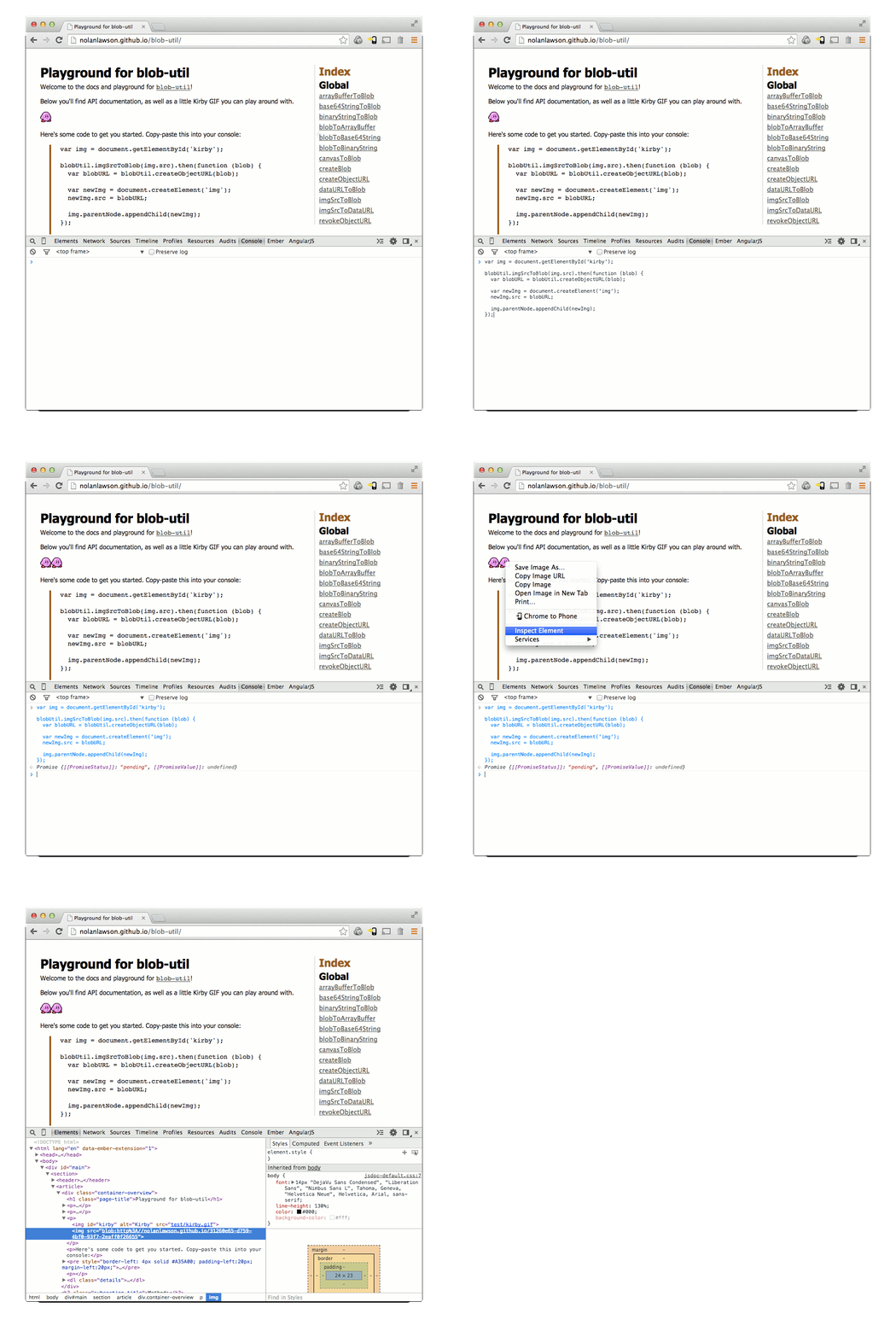 API
-------
Warning: this API uses [Promises](https://promisesaplus.com/), because it's not 2009 anymore.
###Overview
* [createBlob(parts, options)](#createBlob)
* [createObjectURL(blob)](#createObjectURL)
* [revokeObjectURL(url)](#revokeObjectURL)
* [blobToBinaryString(blob)](#blobToBinaryString)
* [base64StringToBlob(base64, type)](#base64StringToBlob)
* [binaryStringToBlob(binary, type)](#binaryStringToBlob)
* [blobToBase64String(blob)](#blobToBase64String)
* [dataURLToBlob(dataURL)](#dataURLToBlob)
* [imgSrcToDataURL(src, type, crossOrigin, quality)](#imgSrcToDataURL)
* [canvasToBlob(canvas, type, quality)](#canvasToBlob)
* [imgSrcToBlob(src, type, crossOrigin, quality)](#imgSrcToBlob)
* [arrayBufferToBlob(buffer, type)](#arrayBufferToBlob)
* [blobToArrayBuffer(blob)](#blobToArrayBuffer)
###createBlob(parts, options)
Shim for
[new Blob()](https://developer.mozilla.org/en-US/docs/Web/API/Blob.Blob)
to support
[older browsers that use the deprecated
API
-------
Warning: this API uses [Promises](https://promisesaplus.com/), because it's not 2009 anymore.
###Overview
* [createBlob(parts, options)](#createBlob)
* [createObjectURL(blob)](#createObjectURL)
* [revokeObjectURL(url)](#revokeObjectURL)
* [blobToBinaryString(blob)](#blobToBinaryString)
* [base64StringToBlob(base64, type)](#base64StringToBlob)
* [binaryStringToBlob(binary, type)](#binaryStringToBlob)
* [blobToBase64String(blob)](#blobToBase64String)
* [dataURLToBlob(dataURL)](#dataURLToBlob)
* [imgSrcToDataURL(src, type, crossOrigin, quality)](#imgSrcToDataURL)
* [canvasToBlob(canvas, type, quality)](#canvasToBlob)
* [imgSrcToBlob(src, type, crossOrigin, quality)](#imgSrcToBlob)
* [arrayBufferToBlob(buffer, type)](#arrayBufferToBlob)
* [blobToArrayBuffer(blob)](#blobToArrayBuffer)
###createBlob(parts, options)
Shim for
[new Blob()](https://developer.mozilla.org/en-US/docs/Web/API/Blob.Blob)
to support
[older browsers that use the deprecated